The title says it all. I’m wondering what this feature is supposed to do. Nothing happens when I select it, and the Reference Manual is no help at all.
QCAD version: 3.21.0.0
openSUSE Linux
The title says it all. I’m wondering what this feature is supposed to do. Nothing happens when I select it, and the Reference Manual is no help at all.
QCAD version: 3.21.0.0
openSUSE Linux
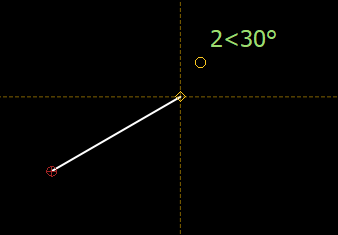
Category and tool name says it all.  It displays the distance and the angle at the mouse pointer.
If there is no distance and/or angle which can be displayed then nothing will happens.
Try this:
Activate the Display Distance/Angle,
Launch the “Line from two points”,
determine the first point and monitor what happens at your mouse-pointer for the second point …
Well - I think text and symbols will give you all hints what you need …
Thanks for your help. I finally figured it out after much trying. It’s a toggle, between several types of info displayed while drawing. The fact that the status of the icon in the menu never changes doesn’t help.
A couple of words to that effect in the Manual would help, since this tool behaves differently from most (or even all) other tools.