V27.0.3 Moverotate, no possibility to enter the angle

QCAD Version: 27.0.3
Downloaded package (file name): qcad-…
Operating System: Mac OS 27

I have attached my drawing file (DXF/DWG)

I proceed like this: Command “moverotate”

This is what I expect to happen: In older versies I had the possibility to input and change the angle of the rotation

This is what happens instead: There is no input field.

Antobe problem in the current version, that I have always to expand the inputbar to see the values.

What I also noticed, the toolbars are in the moment no longer moveable.

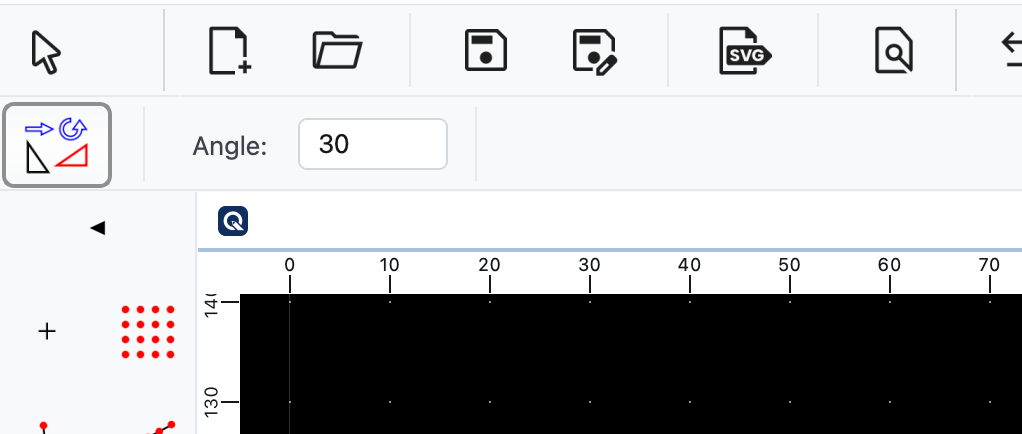
This is how the top left of the application window of QCAD is supposed to look like while using the Move and Rotate tool:

Most likely, you have accidentally rearranged your toolbars in such a way that the options toolbar is cut off.

To rearrange the toolbars, right-click on a toolbar and click “Unlock Toolbars”. Then rearrange in such a way that the options toolbar gets plenty of space (preferably the whole width of the application window). Then right-click on a toolbar again and choose “Lock Toolbars”. This toolbar locking is there to prevent exactly such mishaps in the future.

If you can’t solve the problem, please attach a screenshot, taken while using the Move and Rotate tool.
How to take a screenshot on macOS.

Hello Andrew,

after unlocking the toolbar the command works fine. I locked the toolbar again and checked it, but could not reproduce my problem.

Thanks for your help.