QCAD Version: 27.0.3
Operating System: Linux Mint 22.3, PC with integrated graphics.
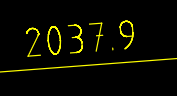
In Application Preferences>Graphics View>Appearance, with ‘Use RHI Graphicsview’ checked, dimension text, which should be green is yellow (dimns are on a layer whose colour is yellow, label colour is set to green) and curved parts of the text are ‘odd’ as below…
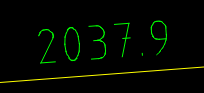
…if I uncheck RHI Graphicsview then dimn text is as it should be…
…in both cases ‘Anti-aliasing on by default’ is checked, if I uncheck Anti-aliasing with RHI Graphicsview checked then the text is rendered correctly but the colour remains incorrect.