Is there a different user manual for the community version than the pro version?
I am finding directions in the manual that I have downloaded are different to the drawing options offered in the community version that I am trying to sort out the following functions:
Selecting for deleting a line.
There is no edit button offered as shown in the manual and in this video @ 1:33: https://www.youtube.com/watch?v=u3OhuJ6qLGk
I have sometimes succeeded in selecting a line and deleting it. Then on another occaision, I went through the same process, but could not get the line to delete. When I click on the delete symbol, it just de-selects the previously selected line. What is going on here?
And: 2. Getting snap selections to be stable.
When I click on a selection in the snap menu, then go to use it, it reverts back to some other setting.
When I click on the delete symbol, it just de-selects the previously selected line. What is going on here?
Multiple duplicate lines at the same position? Just a wild guess
2. Getting snap selections to be stable.
When I click on a selection in the snap menu, then go to use it, it reverts back to some other setting.
QCAD always reverts to auto-snap for each new tool you start. This is intended behaviour and cannot be changed in QCAD CE. The reason being that auto snap works great in probably 98% of all situations when you need to specify a coordinate. For the other 2%, you can temporarily force a particular snap. However, it is very unlikely that after starting a line at an intersection, you will now want to only snap to intersection points from now on.
Perhaps you can elaborate on what you are intending to do or show us a screenshot to allow us to help more efficiently.
FYI: QCAD Pro has Snap > Lock Snap to lock the current snap tool.
I am beginning to suspect that the community edition is not fully functional for any kind of working drawing. (Am I wrong here?). I will look at purchasing the pro version, but only after I have some kind of clarification of most of the outstanding functional problems I am coming up against.
The tool to lock the current snap function was only very recently added. It is certainly not an essential tool and only very few users even know (or care) about it. Auto snap is the way to go.
QCAD Professional does add a lot of valuable tools which are essential for some users (for example splines from fit points, improved DXF support and DWG support). However, as the basic starters CAD the QCAD CE is intended to be, it is certainly a complete enough package for many users.
May I ask if you have any prior experience in CAD (other than drawing packages for illustrational purposes like Inkscape or Corel Draw)?
No - that isn’t exactly how it works! Please read Andrews explanation again to get a better idea how it works.
Yes … you are wrong here.
QCAD CE is already an exceptional and powerful CAD Software and for many user - around the world - absolute adequate for that what they need.
QCAD Pro offers more possibility’s, tools and often a much more convenient way to accomplish a task.
Thanks again for your reply Andrew. I have only had experience in using LibreCad.
I will note that neither I nor the retired career professional draftsman who tutored me with it could get the snap function to perform as it was intended in LibreCad. When it did, it was very inaccurate. I don’t know if that is relevant or not.
It seems that I have to go back and read you short notes on the use of the Qcad snap functions.
I am determined not to be beaten by this!
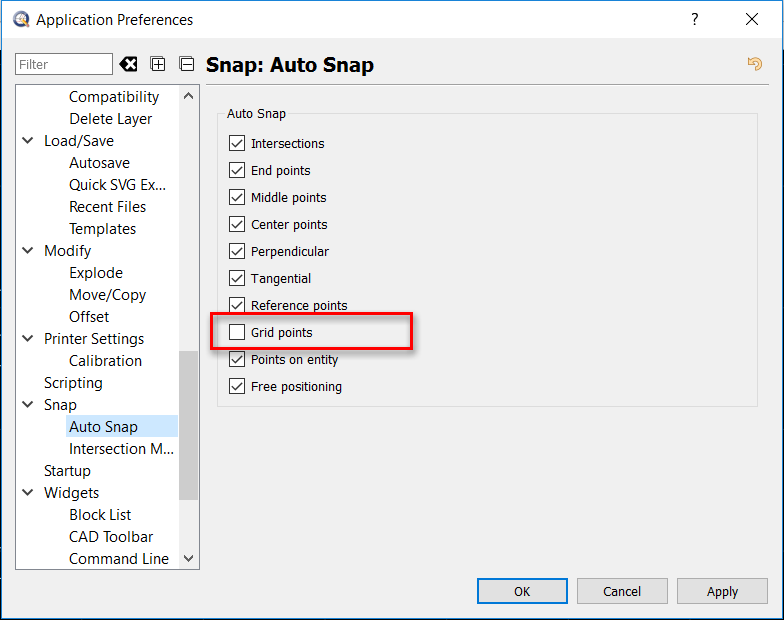
As you can see the Snap to grid option isn’t activated what means as long I’m in the Auto Snap mode it will NOT snap to the grid.
In this short video I’ll draw two “houses”.
The first one only with help of my Auto Snap settings and 5 circles (between the grit points) in my drawing.
House
I launch the “Line from 2 Points” tool and automatically the “Auto Snap” will be activated.
That is all what I need for my first House and I can draw without any snap changes.
House
Here is my goal to use only the Snap to grid function to draw my House. That is for me exceptional in my workflow and that is the reason why it isn’t activated in my default Auto Snap settings. However - now I need it!
I launch the “Line from 2 Points” tool again and automatically the “Auto Snap” will be activated too. To use the snap to grid function I click the corresponding button. Now the Auto snap function is completely deactivated and ONLY the Snap to grid function is active. That is what I need and I can draw my House. The Snap to grid tool will remain active until I change it by myself, I launch a new tool. I “Save as” the drawing or restart QCAD.
I know - all of this sounds really complicated but it isn’t. A little practice and it works like a charm …
Thanks for that Husky.
No, that is not complicated at all to my understanding. It is precisely how I assume it “should” work.
I will try a couple of test drawings again and see if I can get the snap selection to remain stable. By that I mean, stay on what I set it to.
That has been a big part of my problem. It wants to (or wanted to) auto set on some selection that I did not want, sabotaging my efforts to control the drawing.
Must be my incompetence. I will try it again…give me a day or so.
…
edit:
I just did some test drawings and encountered no instability problems at all. It all worked like your example. I have no idea why I was having so much difficulty with the snap options before though.
Never mind. I will edit the thread as solved.
Thanks Andrew and Husky.