Was this ever included ? I can’t see a cloud option in the Painter options dialog box.
Flexpainter Beta v0.42e Update
… or ‘complex line types on steroids’ 
.. but just a minor update.
.and long overdue! (Riverbanks  ).
).

CE bug: Not functional. 
FlexPainter relies vastly on splines and other PRO resources.
Without PROTOOLS present it should be disabled to load. Not tested.
I’ll have to see how lean it can be made.
Fixed some minor issues, typos and so on.
The scope mystery isn’t tackled, the script is functional ‘as is’.
Not verbose, a lot more of the details are spit out on the command history.
A vast amount of info is textual included in the script file itself.
Enhanced the painter definitions types:
Local & Global Poly, now both with bulging.
Castings can be done on a sublayer of the base entity.
Know issue: This can interfere with casting in group.
It will take some more ‘Undo’s’ to undo.
Revised the painter sets and added some.
- Riverbanks 1:1 & 2:3, 3 types each.
- Revision Clouds, 7 types.
Renewed & added all preview icons of these painter sets.
(The hardest part)
Revision Clouds bulging relies on the actual casted distance between points.
On non uniform base lines this looks rather ‘at random’ with a theme.
Most Painters now have a Begin and End -Apex.
- Artistics.
- Pointing V-shape extrusions for Revision Clouds.
Drag the top node to point where you want it to point. - Voids, in general 1/2 of what makes more sense: the length or the step-size.
An apex is considered as something intentional.
A void as Apex doesn’t merge with any exposed void of the chain for global alignment or only an extra painter .
This feature isn’t yet tested in full.
Remark that apexes are not applicable on <geometric closed & near continuous forms>.
 for Revision Clouds with V-pointers use:
- a non-continuous form (V @ begin), preferable geometric closed.
- both apexes
- dynamically scale
FlexPainter 42e.zip (369 KB)
(# Note that FlexPainter Beta v0.42e is included in a recent standard installation of QCAD #)
This zip package with version 0.42e is intended to be extracted to:
… QCAD\scripts\Misc\Examples\MathExamples\FlexPainter
Included is a subfolder with the icons.
Included is a subfolder ‘FlexPainterTemplates’ with 2 dxf drawings.
- One is a tutorial on how the painter is constructed, and one with a bunch of test cases.
- On a win system it might be better to move these dxf files out of the protected OS portion as Admin.
Andrew may include this in a newer release or snaptshot.
Immediate short update:
- Copy over the .js and the .ui file.
- Replace the Icon folder.
- Boot or Reboot QCAD
Regards,
CVH
Flexpainter really is a work of art CVH and a credit to your scripting skills. It also shows just how powerful Qcad is, and can be, with clever scripts like this.
I could play with it all day, the curtain rope fascinates me 
Thanks,
Curtain rope is a proto … and was ‘the’ proto.
It has two distinct apexes that you can not swap.
Intended is to make a hard and a soft version.
I have changed the first topic title just now.
Regards,
CVH
CVH, - Many thanks for FlexPainter.
I will use auxiliary lines to frame a drawing revision area, then apply FlexPainter to this selection to create the revision cloud surrounding the change. Auxiliary lines layer then turned off for a presentation print or pdf output.
Note to all that FlexPainter 0.42e is included in QCAD 3.25.1 default installation.
Misc/Script Examples/Mathematics/FlexPainter
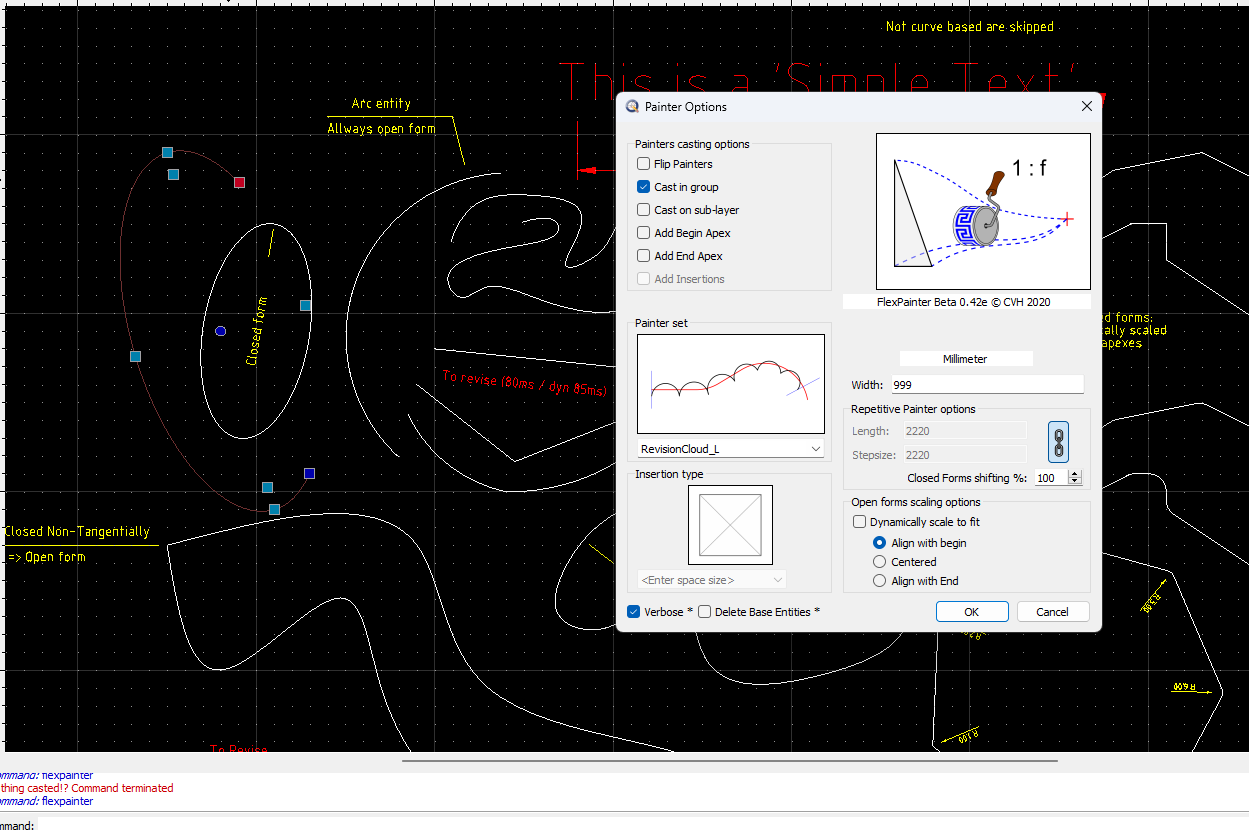
Hi,
Thanks for using FlexPainter.
Your painter width is set to 999mm also meaning that 1 painter set is scaled up to be 2220mm long.
FlexPainter won’t cast anything below 3 copies of a painter set, the upper limit is 9999 copies.
The selected entity in the example drawing is about 325mm long.
I know that it is an ambiguous used terminology in the beta version, but clearing “Verbose” would list more details on the Command History.
- Version Beta 0.42e
Painter set: RevisionCloud_L
Width: -999
Length: 2220
Stepsize: 2220
-
-
- = * = - - -
Ellipse Too short. Skipped!
Nothing casted!? Command terminated
- = * = - - -
-
Regards,
CVH
Hi CVH
Thanks, sorry for being so dense. I’ve also worked out now (relearned :mrgreen: ) that I have to draw a shape around the object I want to highlight and then flexpainter converts that shape into a revision cloud, and the flip option will determine what side of the object line the cloud bumps appear on.
(I’m posting these verbose instructions here so that they will be here for my future reference.)