Hello,
Edit: OS: Win10, QCAD: 3.24.2
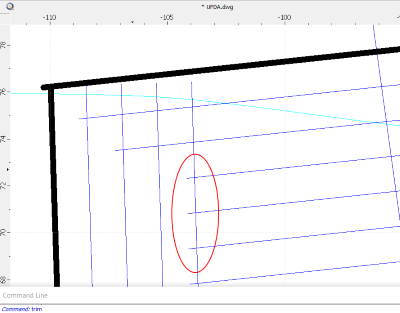
I’m having a strange problem where trimming a line leaves a tail beyond the limiting entity. In the attached picture, the blue lines were created using “parallel with distance” from the thick black lines. When I try to trim the ~horiz line to the ~vert it leaves a little overshot tail.
If I draw new lines manually they trim fine. Also, if I split the horizontal entity into multiple segments, it also trims fine.
Hi,
Thank you for your replies! I attached a reduced file.
Try to trim one of the horizontal blue lines using a vertical blue line as limiting entity.
I’m new to QCAD so please forgive if I made some silly mistake.
Thanks UPDA-R32.dwg (18.4 KB)
CVH was spot on: there are several 3D elements with Z coordinates. You can use Misc > Modify > Flatten Drawing to 2D. Obviously this will get rid of the Z coordinates.
thank you CVH & Andrew. How do I identify the 3D elements? The source of this file is an older format DXF, and I suspect it’s created as part if the import.