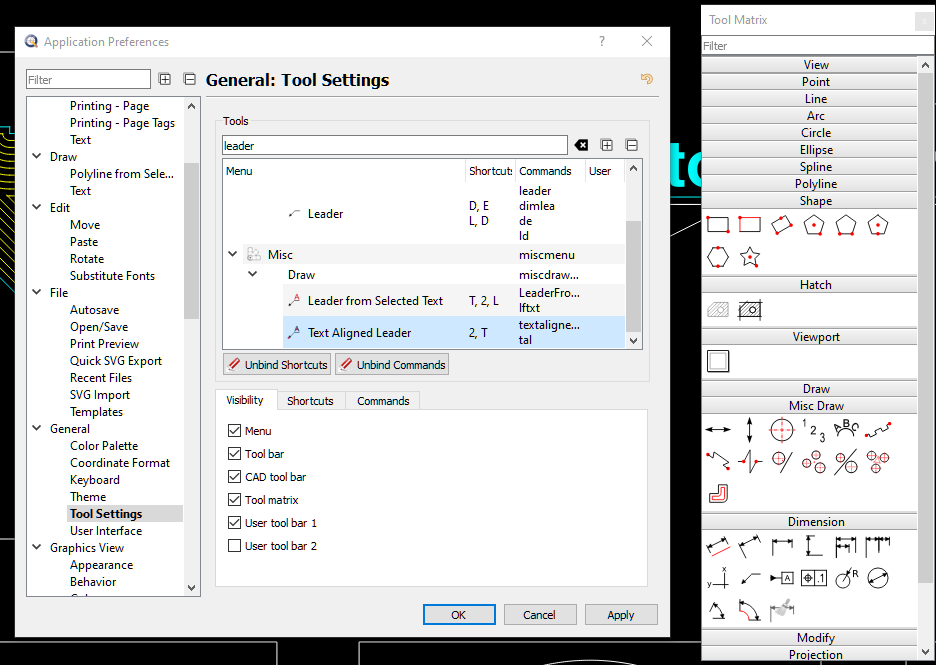
I would expect the icons would show up below the Dimension bar but can’t find them. Same with the Tool matrix. No icons displayed for the new leader tools …
I’ve seen that the script contents the icons - how can I make them visible/usable in the Tool bar?
These tools only add themselves to the misc menu, no other widgets (toolbar or matrix).
You could add them to one of the user toolbars which should work if they have an icon.
Yes that works but I think if we have three leader styles then they belong together within the Dimension tools. I followed also the development of those tools and noticed in an earlier station that they where already part of those bars and menus. It makes no sense to me why it has to be changed for the final tool implementation. Text-aligned leader - QCAD 'Script Add-On & Plug-in challenge' - QCAD Forum