[solved] Insert Block with attributes

Hello!

I fail to insert a Block with attributes. I only get all other elements of the block insert, without the attributes. I tried to combine it with insertBlock.js but I failed.

Here is the code. The Problem occurs at the line with “this.attributes[tag]”. i know “this” is wrong in this context but i can not figure out how to solve it.

var doc = this.getDocument();
var di = this.getDocumentInterface();
var op = new RAddObjectsOperation();
block = doc.queryBlock("Rohrbezeichnungen");
					EAction.handleUserMessage(block.toString())
					idBlock =block.getId()
					var bd = new RBlockReferenceData( idBlock,
						new RVector(1,1),// position
						new RVector(1,1),
						0, //angel
						1, //columncont
						1,//rowcount
						1,//colunspacing
						1)
					var blockRef = new RBlockReferenceEntity(doc,bd)
					op.addObject(blockRef);
					
					// create attribute for each attribute definition in block:
					var blockRefId = doc.getStorage().getMaxObjectId();
					var ids = doc.queryBlockEntities(idBlock);
					for (var i=0; i<ids.length; i++) {
						var id = ids[i];
						var attDef = doc.queryEntity(id);
						if (!isAttributeDefinitionEntity(attDef)) {
							EAction.handleUserMessage("nix")
							continue;
						}
						EAction.handleUserMessage("schon")
						var att = new RAttributeEntity(
									doc,
									new RAttributeData(attDef.getData(), blockRefId, attDef.getTag())
									);
						att.setBlockId(idBlock);
						EAction.handleUserMessage(attDef.getTag().toString())
						// att.setInvisible(attDef.isInvisible());
						blockRef.applyTransformationTo(att);
						
						// att.setText("sdjfl")
						// assign values to attributes:
						var tag = att.getTag();
						if (!isNull(this.attributes[tag])) {
							att.setText(this.attributes[tag]);
							// att.setText("sdkfjsöl");
						}

						op.addObject(att, false);
					}

Thanks

Hi,
this.attributes is probably not defined …

Note that there are 2 scripts working together when you insert a Block Reference entity with the GUI.
InsertBlock.js :

    • \brief This action handles the user interaction to insert a block
  • from the block list into the drawing.

BlockInsert.js :

    • \brief Base action for actions that insert blocks from the drawing or
  • other sources.

The first automatically includes the second.

While InsertBlock.js is said to handle the user interactions …
… It are:
BlockInsert.prototype.slotAttributeTagChanged()
and
BlockInsert.prototype.slotAttributeValueChanged(…)
That handle the user interaction concerning tags and values in the Option Toolbar.

On any change in the Options Toolbar these record the values for the Block Attributes to create in this.attributes.
this.attributes is thus nothing more than an object with the tag values you are about to set.

If you don’t used the GUI method BI or without interaction then you need to fill in all the attribute tag values yourself.
For each attribute tag or better for each RAttributeDefinitionEntity in the Block a certain value.
Or keep the default value.

Regards,
CVH

thanks. I got i “working” know. The strange thing is, that the attributes only show up after i close and reload the file. I think i am missing something du update the inteface

var doc = this.getDocument();
	var di = this.getDocumentInterface();
	var op = new RAddObjectsOperation();
	
blockRef.applyTransformationTo(att);
						att.setText("sdkfjsöl");
						op.addObject(att, false);
... other code

di.applyOperation(op);
	 di.killAllActions() // um in den selectionsmode zurückzukommen

That last instruction is usually not required.

It seems your code is ‘hanging’ somewhere.
Has it a beginEvent? Do you terminate that with:

    // Terminate beginEvent:
    this.terminate();


Do the attributes pop up when you swap to another drawing tab and back?

Perhaps you need to include:

    di.regenerateScenes();

But that should be done automatically after your script ends properly.

Without the full code I am only guessing. :wink:

Regards,
CVH

Thanks for your answer.
I tried with you suggestions, but it did not work. I realized know, that i also handled the code probably in a strange way, cause i am interacting the first time in the code with teh ui an i am sure its really not well done. Here is the full coden

include("scripts/EAction.js");
// todo ok Button übernehmen in Ausführen
function Rohrbezeichnung(guiAction) {
    EAction.call(this, guiAction);

     this.pos = undefined;
    this.radius = undefined;

    this.setUiOptions("Rohrbezeichnung.ui"); 
}

Rohrbezeichnung.prototype = new EAction();

Rohrbezeichnung.prototype.beginEvent = function() {
    EAction.prototype.beginEvent.call(this);

    var di = this.getDocumentInterface();
    di.setClickMode(RAction.PickCoordinate);
};

Rohrbezeichnung.prototype.pickCoordinate = function(event, preview) {
    this.pos = event.getModelPosition();

    if (preview) {
        this.updatePreview();
    }
    else {
        this.applyOperation();
    }
};

Rohrbezeichnung.prototype.getOperation = function(preview) {
	
};

Rohrbezeichnung.prototype.slotcb_durchmesserChanged = function(v) {
    this.durchmesser = v;
    this.updatePreview();
};
Rohrbezeichnung.prototype.slotcb_pnChanged = function(v) {
    this.PN = v;
    this.updatePreview();
};
Rohrbezeichnung.prototype.slotccb_werkstoffChanged = function(v) {
    this.werkstoff = v;
    this.updatePreview();
};
Rohrbezeichnung.prototype.slotcb_postfixChanged = function(v) {
    this.postfix = v;
    this.updatePreview();
};
Rohrbezeichnung.prototype.slotcb_praefixChanged = function(v) {
    this.praefix = v;
    this.updatePreview();
};

Rohrbezeichnung.prototype.slotbut_ok = function() {
    var appWin = EAction.getMainWindow();
    if (isNull(this.durchmesser) && this.ok == false) {
        return undefined;
    }
	var appWin = EAction.getMainWindow();
	appWin.handleUserMessage(isNull(this.ok).toString())
	appWin.handleUserMessage("durchmesser und ok")

	
	appWin.handleUserMessage("Rohrleitungen beschriften")
	var doc = this.getDocument();
	var di = this.getDocumentInterface();
	var op = new RAddObjectsOperation();
    var ids  = doc.queryAllEntities();
	appWin.handleUserMessage(ids.length.toString())
	for (var i=0; i<ids.length; i++) {
        var id = ids[i];
        var entity = doc.queryEntity(id);
        if (isPolylineEntity(entity) &&
			( entity.getLayerName().indexOf("Räume") == -1 ) && // nicht auf Räumelayer
			(entity.getLayerName().indexOf("Räume") == -1 ) && // nicht auf Messlinielayer
			 (entity.getLayerName().indexOf(" ... ") != -1 ) && // nur Sublayer
			 (entity.isVisible())
		) {	
		
			var dn = entity.getCustomProperty("QCAD","DN","no") // no steht für Wert nicht vorhanden
			if (dn == "no") entity.setCustomProperty("QCAD","DN","").setList("sdjfl,"); //wenn Property nicht vorhanden dann hinzufügen
			
			if (dn =="no") dn = "";
			var rohrbezHandle = entity.getCustomProperty("QCAD","rohrbezHandle","no") // no steht für Wert nicht vorhanden
			if (rohrbezHandle == "no") entity.setCustomProperty("QCAD","rohrbezHandle",""); //wenn Property nicht vorhanden dann hinzufügen
			if (rohrbezHandle =="no") rohrbezHandle = "";
			
			var zoll = entity.getCustomProperty("QCAD","Zoll","no") // no steht für Wert nicht vorhanden
			if (zoll == "no") entity.setCustomProperty("QCAD","Zoll",""); //wenn Property nicht vorhanden dann hinzufügen
			if (zoll =="no") zoll = "";
			var werkstoff = entity.getCustomProperty("QCAD","Werkstoff","no")
			if (werkstoff == "no") entity.setCustomProperty("QCAD","Werkstoff",""); //wenn Property nicht vorhanden dann hinzufügen
			if (werkstoff =="no") werkstoff = "";
			var pn = entity.getCustomProperty("QCAD","PN","no")
			if (pn == "no") entity.setCustomProperty("QCAD","PN",""); //wenn Property nicht vorhanden dann hinzufügen
			if (pn =="no") pn = "";
			var prefix = entity.getCustomProperty("QCAD","Prefix","no")
			if (prefix == "no") entity.setCustomProperty("QCAD","Prefix",""); //wenn Property nicht vorhanden dann hinzufügen
			if (prefix =="no") prefix = "";
			var postfix = entity.getCustomProperty("QCAD","Postfix","no")
			
			if (postfix == "no") entity.setCustomProperty("QCAD","Postfix",""); //wenn Property nicht vorhanden dann hinzufügen
			if (postfix =="no") postfix = "";
			op.addObject(entity,false);
			
			
			var rohrbezeichnung = ((prefix!="") ? prefix +" ":"")+ ((dn!="") ? "DN"+dn +" ":"") + ((zoll!="") ? zoll +"\" ":"")+ ((pn!="") ?" PN"+pn +" ":" ") + werkstoff +((postfix!="") ?" "+ postfix :"")


// addSimpleText("standard", xBeschriftung, yBeschriftung); // string, font, center x, center y, height, bold, italic, V align, H align
			if (rohrbezeichnung != " ") { // wenn rohbbez. nicht leer
				// appWin.handleUserMessage(Math.floor(entity.countVertices()/2).toString());
				var v1 = Math.floor(entity.countVertices()/2);
				// appWin.handleUserMessage(v1.toString());
				var v2 = v1-1;
				// appWin.handleUserMessage(v2.toString());
				var x1 = entity.getVertexAt(v1).x;
				var x2 = entity.getVertexAt(v2).x;
				var y1 = entity.getVertexAt(v1).y;
				var y2 = entity.getVertexAt(v2).y;
				// appWin.handleUserMessage(x1.toString());
				// appWin.handleUserMessage(x2.toString());
				// appWin.handleUserMessage(y1.toString());
				// appWin.handleUserMessage(y2.toString());
				var xBeschriftung = (x1+x2)/2;
				var yBeschriftung = (y1+y2)/2;
				// appWin.handleUserMessage("Beschriftung");
				// appWin.handleUserMessage(xBeschriftung.toString());
				// appWin.handleUserMessage(yBeschriftung.toString());
				// appWin.handleUserMessage(rohrbezeichnung.toString());
				// appWin.handleUserMessage(entity.getLayerName().toString());
				appWin.handleUserMessage(entity.getLayerName())
				doc.setCurrentLayer(entity.getLayerName().toString());//Rohbezeichnung auf den Rohrtextlayer
				appWin.handleUserMessage("Layer angepasst")

				var rohrbezHandle = entity.getCustomProperty("QCAD","rohrbezHandle","no")
				appWin.handleUserMessage(rohrbezHandle.toString())
				appWin.handleUserMessage((!isNull(doc.queryObjectByHandle(Number(rohrbezHandle)))).toString())

				if ((rohrbezHandle == "no")||(rohrbezHandle == "")|| //Wenn Rohrbezeichnungsid bei Rohr noch nicht vorhanden Oder
					// (doc.queryObjectByHandle(Number(rohrbezHandle)).isUndone())||
					isNull(doc.queryObjectByHandle(Number(rohrbezHandle)))){//Wenn Rohrbezeichnungs geöscht wurde
					appWin.handleUserMessage("Neue Bezeichnung setzen")
					
					
					//Versuche Block einzufügen
					// Block mit passender höhe
					block = doc.queryBlock("Rohrbezeichnungen");
					EAction.handleUserMessage(block.toString())
					idBlock =block.getId()
					var bd = new RBlockReferenceData( idBlock,
						new RVector(xBeschriftung,yBeschriftung),// position
						new RVector(1,1),
						0, //angel
						1, //columncont
						1,//rowcount
						1,//colunspacing
						1)
					var blockRef = new RBlockReferenceEntity(doc,bd)
					op.addObject(blockRef);
					
					// create attribute for each attribute definition in block:
					var blockRefId = doc.getStorage().getMaxObjectId();
					var idsBE = doc.queryBlockEntities(idBlock);
					for (var k=0; k<idsBE.length; k++) {
						var idBE = idsBE[k];
						var attDef = doc.queryEntity(idBE);
						if (!isAttributeDefinitionEntity(attDef)) {
							EAction.handleUserMessage("nix")
							continue;
						}
						EAction.handleUserMessage("schon")
						var att = new RAttributeEntity(
									doc,
									new RAttributeData(attDef.getData(), blockRefId, attDef.getTag())
									);
						att.setBlockId(idBlock);
						EAction.handleUserMessage(attDef.getTag().toString())
						// att.setInvisible(attDef.isInvisible());
						blockRef.applyTransformationTo(att);
						att.setText("sdkfjsöl");
						op.addObject(att, false);

						// di.applyOperation(op);
					}
					EAction.handleUserMessage("dhsflkd")


					//Text erstellen und id schreiben
					//Beschriftung einfügen
					di.selectEntity(Number(rohrbezHandle), false);
					var textPos = new RVector(xBeschriftung,yBeschriftung);
					var textData = new RTextData(
					textPos,            // position
					textPos,            // alignment point
					1,               // height
					1.0,                // text width (ignored for now)
					RS.VAlignBottom,       // alignments
					RS.HAlignCenter,
					RS.LeftToRight,
					RS.Exact,
					1.0,                // line spacing factor
					rohrbezeichnung,           // the text
					"Corble",          // font
					false,              // bold
					false,              // italic
					0.0,                // angle
					true               // simple text without formatting
					);
					
					if (x1==x2) textData.setAngle(1.5707963268); //wenn senkrecht auf 90 grad drehen
					var text = new RTextEntity(doc, textData);
					op.addObject(text,false);
					di.applyOperation(op);
					op = new RAddObjectsOperation();
					
					var rohrbezHandle = text.getHandle().toString()
					entity.setCustomProperty("QCAD","rohrbezHandle",rohrbezHandle); 
					//custom property zu Rohr hinzufügen
					op.addObject(entity,false);
					
				}else{// nur text ändern wenn bei Rohr Verweis auf eine Bezeichnung
					appWin.handleUserMessage("nur Text der Rohrbezeichnung anpassen")
					// appWin.handleUserMessage(rohrbezHandle.toString())
					obj = doc.queryObjectByHandle(Number(rohrbezHandle));
					var text = doc.queryEntity(obj.getId());
					text.setText(rohrbezeichnung); //text akutalisieren
					// appWin.handleUserMessage(text.isUndone().toString())
					op.addObject(text,false);
					di.applyOperation(op);
				}
				
				
			}
			 // appWin.handleUserMessage("Rohrbezeichnung fertig")
        }
	}
	
	 di.applyOperation(op);
	 di.killAllActions() // um in den selectionsmode zurückzukommen
};

Rohrbezeichnung.init = function(basePath) {
    var action = new RGuiAction(qsTr("&Rohrbezeichnung"), RMainWindowQt.getMainWindow());
    action.setRequiresDocument(true);
    action.setScriptFile(basePath + "/Rohrbezeichnung.js");
    action.setGroupSortOrder(16600000);
    action.setSortOrder(3);
    action.setWidgetNames(["H2OfficeMenu"]);
};

How are you running this script?

I added this line of code to the init() function to be able to run it from the command line: action.setDefaultCommands([“rohrbezeichnung”]);

It looks like all it does at this point is that it starts up the pickCoordinate() function and then has no way of getting past that and can’t make it to this.terminate().

Assuming you’re still trying to “insert a block with attributes”, one way of going about moving this script forward is as follows:

Add in a way to run the script from the GUI. What I said above allows you to run it by typing in rohrbezeichnung to the GUI’s command line. You should also probably at least attempt to add the script to a dropdown menu. See the QCAD tutorials for additional information on how to do that: QCAD: Menus and Tool Bars

Next, you’re likely going to need a way to select which block you want to insert. If it was me, I’d probably start the script by popping up a dialog box with a dropdown list of all available blocks along with some way of selecting which attributes you want to place on the block. See the QCAD tutorials for additional information on how to start thinking about this: QCAD: Persistent Widgets. That link is a little bare-bones, so you’ll probably want to look through the Qt documentation as well. This part would likely need to go in the beginEvent() function so that it is ran automatically.

After the user does whatever they need to within the dialog box, the beginEvent() function would then call the pickCoordinate() function in order to figure out where in the drawing you want to insert your block. See the QCAD tutorial here for a simple example on how to do this: QCAD: Creating a New Tool and also my thread here for a simple example of how to do the preview: Preview Implementation

All your other functions within the script don’t seem to be called anywhere so I can only just glance at them and speculate about them at this point. You should probably attempt to do the above and start trying to call your other functions in order to make some progress on your script. At first glance, I notice all of the custom properties you’re messing with. Based on my current understanding of custom properties at this time, they are more for storing information within the document so that the information can be exchanged between multiple different scripts. If all you’re trying to do is to “insert block with attributes” then you likely don’t need them. If this is a part of a larger project, then maybe you do, but you might want to tackle the “insert block with attributes” part first.

All of those functions where you’re calling updatePreview() likely aren’t needed since preview is ran in an infinite loop by pick coordinate. For the preview, you only need to fill out your getOperation(preview) function which is likely similar to QCAD’s insertBlock() script which can be found here: qcad/scripts/Block/InsertBlock/InsertBlock.js at master · qcad/qcad · GitHub

It looks line the slotbut_ok() function is the main thing you’ve been working on up to this point. This function looks a lot less like you’re trying to “insert block with attributes” and a lot more like you’re trying to query every entity in the drawing and edit their properties based on certain criteria and then add those entities to a specific block then change the block itself’s attributes then re-query every entity in the block (the ones that were already queried previously) and edit their attributes and finish up by adding some text. Is this the case? If so, it might be easier to break the script up into smaller, more manageable chunks, get each chunk working, then combine all of them after.

Anyways hope that helps. Sorry for it being so much but your script seems to be attempting to do a lot more than simply inserting a block with attributes. I’m sure CVH will probably have some more to add as well. Good luck.

Hi,

As interactive script is crippled in various ways.
To test any correction/addition I need at least the file: Rohrbezeichnung.ui

I see some things based on custom properties of entities.
To test the intended functionality I need an example file.
That should also include the Block called ‘Rohrbezeichnungen’
Remark that your code doesn’t handle the absence of this block.

I see no relation (yet) between custom properties and Attribute text, all Attributes receive the text ‘sdkfjsöl’ just before they are added.

Although it seems that your code doesn’t require states … It should have one single state.
It recursively adds a Block Reference with Attributes at a position until you stop the tool, usually with the right mouse button.
A script without states would do one set of operations and then terminate … Properly … :wink:
At the moment your operations seems to be handled by an OK button … ???

Creating the operations with interactions should be part of prototype.getOperation(preview)
That way EAction will show a preview when hovering or apply the operations when you select a position.

But perhaps interaction is not required at all …
The OK button scans for ALL polyline entities among ALL entities, filtering out 2 layers, only on sub layers and only those visible.
And then I wonder why you need an interaction by getting a coordinate using pickCoordinate
The position for inserting the Block Reference is based on the middle of things …
… And not at all given by the user … ?

Some remarks:

  • Code is native in English, it would be handy to keep everything in English.
  • It is common to use 4 spaces for an indentation instead of a TAB.
  • Instead of using appWin.handleUser… simply use EAction.handleUser… (Message, Info, Warning, Command)
  • What is the short for ‘Messlinielayer’? Because you test twice for indexOf(“Räume”) == -1.
  • Explain what the intention is of .setList(“sdjfl,”) while setting a custom property for DN.
  • Here is a list of group sort orders: [SOLVED] menu item order - QCAD Script Programming & Contributions - QCAD Forum
    Not saying that 16600000 is falsely but it tend to get a very large integer … :wink:
    On the other hand, the sort order is usually 100 based so that one can still rearrange/insert tools like setting the order to 250 or so.

Regards,
CVH

Hello!

Thanks for your answer! Like i said, the code is/was messy. Cleaned it up a bit know with an example file. If the block is insert with the code, only the elipse appears but not the block attibut:

Probe.prototype.beginEvent = function() {
    include("scripts/simple.js");
include("scripts/Tools/arguments.js");
    //Start imports

var appWin = EAction.getMainWindow();
 appWin.handleUserMessage("Handles einblenden")
var doc = this.getDocument();
var idsBlock = doc.queryAllBlocks();
var di = this.getDocumentInterface();
var op = new RAddObjectsOperation();
block = doc.queryBlock("Rohrbezeichnungen");
                    EAction.handleUserMessage(block.toString())
                    idBlock =block.getId()
                    var bd = new RBlockReferenceData( idBlock,
                        new RVector(0,0),// position
                        new RVector(1,1),
                        0, //angel
                        1, //columncont
                        1,//rowcount
                        1,//colunspacing
                        1)
                    var blockRef = new RBlockReferenceEntity(doc,bd)
                    op.addObject(blockRef); 
                    
                   // var blockRefId = doc.getStorage().getMaxObjectId();
                    // var idsBE = doc.queryBlockEntities(idBlock);
                    // for (var k=0; k<idsBE.length; k++) {
                        // var idBE = idsBE[k];
                        // var attDef = doc.queryEntity(idBE);

                        // if (!isAttributeDefinitionEntity(attDef)) {
                            // EAction.handleUserMessage("nix")
                            // continue;
                        // }
                      // }
di.applyOperation(op);
 // di.killAllActions() // um in den selectionsmode zurückzukommen
};

240604probe.dxf (97 KB)

Cleaned it up a bit’ … You could better say that you removed almost everything. :unamused:

At first glance:

  • The file is empty, except for the Block, there is no entity with custom properties to handle: e.g. ‘DN’, ‘PN’, ‘Zoll’, ‘Werkstoff’, …
  • The only thing you add is a Block Reference based on the Block ‘Rohrbezeichnungen’.
  • The code to cycle Attribute Definitions in the Block is ruled out, remarked out.

A Block Reference and it Attributes are separate things, distinct different entities types.
Block Attributes are associated with one specific Block Reference.
An orphaned Attribute is merely text.
To add a Block Reference entity with Block Attribute entities one has to include Attribute Definition entities in the Block definition.

In your Block Definition there is one Attribute Definition:
Tag = “Rohrbezeichnung”
Prompt = “Rohrbezeichnung”
Default value = “xx”

The idea is that you query all Attribute Definitions entities in the Block and add an associated Attribute for each found.
Instead of using the default value one can define a new text for each Attribute.
We want the Attributes to be associated with the Block Reference …
The problem is that the Block Reference is not yet part of the drawing and has not received an entity id yet.
(And there the former code failed, eureka)

The trick here is that we know that the first thing we are going to add is the Block Reference.
That will receive the next available id when the operation is applied.
Hence:

    var blockRef = new RBlockReferenceEntity(doc, bd)
    op.addObject(blockRef);

    var blockRefId = doc.getStorage().getMaxObjectId();

blockRefId is the entity id that will be assigned to the Block Reference when the operation is applied.

In your former code you first added a modified Polyline back.
The Block Reference did not receive id getMaxObjectId() but it received id getMaxObjectId() +1.
You then associated the Attributes with the new next id, thus with the Polyline what is a no go.

On save/reload they probably got orphaned and became visible.

The right code is thus:

    var doc = this.getDocument();
    var di = this.getDocumentInterface();

    // Create an operation to add objects and set Undo/Redo text
    var op = new RAddObjectsOperation();
    op.setText("<Whatever>");

    // Get the custom Block and its id:
    var block = doc.queryBlock("Rohrbezeichnungen");
    var blockId = block.getId();

    // Create a Block Reference Data object:
    var bd = new RBlockReferenceData(
                    blockId,    // referencedBlockId
                    new RVector(0, 0),    // position
                    new RVector(1, 1),    // scaleFactors
                    0,    // angel
                    1,    // columnCount
                    1,    // rowCount
                    1,    // colunSpacing
                    1    // rowSpacing
                    );

    // Create a Block Reference and add it to the operation:
    var blockRef = new RBlockReferenceEntity(doc, bd);
    op.addObject(blockRef);

    // # Issue # For adding associated Attributes we need the Block Reference id 
    // The Block Reference is new and the entity id is not yet defined
    // Retrieve next up id:
    var blockRefId = doc.getStorage().getMaxObjectId();

    // Create an attribute for each attribute definition found in the block:
    var ids = doc.queryBlockEntities(blockId);
    for (var i=0; i<ids.length; i++) {
        var id = ids[i];
        var e = doc.queryEntity(id);
        if (!isAttributeDefinitionEntity(e)) {
            continue;
        }
        var att = new RAttributeEntity(
                        doc,
                        new RAttributeData(e.getData(), blockRefId, e.getTag())
                        );
        att.setBlockId(blockId);
        blockRef.applyTransformationTo(att);

        // # Issue # With more than one attribute definition, one needs to diversify as to which tag gets which value
        // Assign a value to this single attribute:
        att.setText("<Whatever>");

        // Add this Attribute to the operation:
        op.addObject(att, false);

    // Remark that with a single Attribute one can break the for loop here
    }

    // Apply all operations:
    di.applyOperation(op);

Remark that this is for one single Block Attribute only :exclamation:

I left the first lines out because I don’t see this as a beginEvent.
And including those two script is not required IMHO.
There is nothing that relates to ‘Start imports’

e_confused … Including arguments.js …
… Is the intention of this a Command Line Tool?

Regards,
CVH

Hey CVH!

Thanks for your help again and the explanation. I would never have understood that without your help.

Nevertheless if i run your code with the attached file i get the following result:
Run Code:
Select Everything → only a Block Reference appears in the Selection (not Attribute)
I save the file an reopen it i have also an attribute
if i use this script 3 times in a file (insert 3 Blocks) open and close it, only on attribute is existing on reopen

Never expected, that this is so an complicated operation.

Remark that this is for one single Block Attribute only

I thought, this refered only to on Attribute per block. Quite confused i am.

Opened the provided file.
Selected the code block I provided above and copied all
Initiated the Script Shell (GE)
Pasted the code into the command line of the Script Shell
Closed the shell
Zoomed to all (ZA) and a bit out

And then I see:


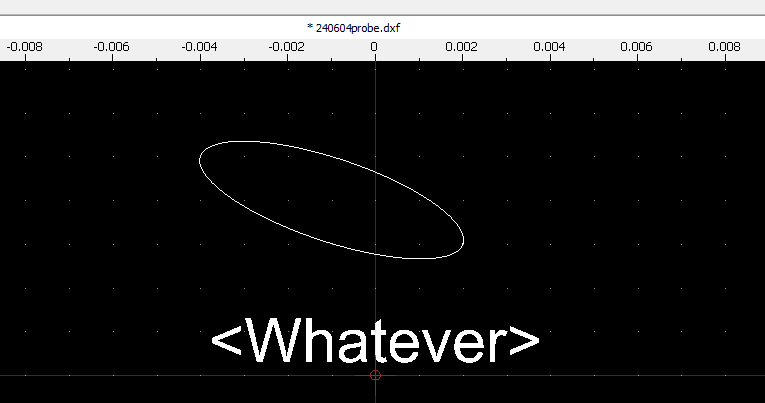
It is obvious that my code works, the single Attribute text was set to “Whatever”.
:exclamation: But there is a major flaw. :exclamation:
It is then inserted as attribute in the Block ‘Rohrbezeichnungen’. :blush:

It is not inserted as an Attribute Associated with the Block Reference.
An Attribute added in a Block Definition is an entity that is part of the Block and thus also displayed as part of the Block Reference.
The more we run the script the more duplicates are added to the Block Definition of Block ‘Rohrbezeichnungen’.
And that is not the intended action.

The new Block Reference will automatically end up in the current Block, usually Model_Space.
The new Attribute entity is cloned data from the Attribute Definition entity and that sits in Block ‘Rohrbezeichnungen’.
So you need to force it to the current Block.

Change this line:
att.setBlockId(blockId);
In: att.setBlockId(doc.getCurrentBlockId());

Sorry for the inconvenience.

If you want to ensure that both end up in Model_Space disregarding what the current Block is you could force both by:
blockRef.setBlockId(doc.getModelSpaceBlockId());
and
att.setBlockId(doc.getModelSpaceBlockId());
For each before adding them to the operation.

Regards,
CVH

Are you sure you want the attribute entity and not just the attributes themselves? I think he might want to insert a block with attributes such as layer, color, etc.


I think he means Block Attributes and not the entity attributes such as: Color, Linetype, …

The process is basically the same as InsertBlock.js in conjunction with BlockInsert.js
But that is an interactive script where the tags of Attribute Definitions are preloaded to a drop-down box in the Option Toolbar.
One entry for each Attribute to create. The collection is a named list in this.attributes.

Regards,
CVH

Hello!

Yes, my question was about the tricky Block attributes. I am out of office at the moment, and will try it on Monday, but i have the feeling a solution is reached!!!

@CVH

Sorry for the inconvenience.

You are so funny!!! You are helping me / us so much, i learned from you a lot and you are not only giving solutions for problems you are also explaining them really well. And the your solution has a small error and you are writing this sentence!!! I have to say a big thank you for your time and help. I am trying to develop a package to make PID shemes in qcad and it works out quite well until now.

If i have a first quite stable working approach, I think i will share it. I was searching for a long time for a good tool, to make pids, and now i found i happily with qcad and the help of the forum!

greets

Here the working code for multiple Block references.
My personal use for this is, to add Text to blocks on a layer. Adding it as a serparte block i can hide the text easily, if i hide all block references and it work independent of the visual layers.

Thanks a lot CVH

    var doc = this.getDocument();
    var di = this.getDocumentInterface();
    for (var f=0; f<10; f++) {
        EAction.handleUserMessage(f.toString())
        // Create an operation to add objects and set Undo/Redo text
        var op = new RAddObjectsOperation();

        // Get the custom Block and its id:
        var block = doc.queryBlock("Rohrbezeichnungen"); //change name of Block here, Block should have one attribute
        var blockId = block.getId();

        // Create a Block Reference Data object:
        var bd = new RBlockReferenceData(
                        blockId,    // referencedBlockId
                        new RVector(f, f),    // position
                        new RVector(1, 1),    // scaleFactors
                        0,    // angel
                        1,    // columnCount
                        1,    // rowCount
                        1,    // colunSpacing
                        1    // rowSpacing
                        );
        // Create a Block Reference and add it to the operation:
        var blockRef = new RBlockReferenceEntity(doc, bd);
        blockRef.setBlockId(doc.getModelSpaceBlockId());
        op.addObject(blockRef);

        // # Issue # For adding associated Attributes we need the Block Reference id 
        // The Block Reference is new and the entity id is not yet defined
        // Retrieve next up id:
        var blockRefId = doc.getStorage().getMaxObjectId();
        // Create an attribute for each attribute definition found in the block:
        var ids = doc.queryBlockEntities(blockId);
        for (var i=0; i<ids.length; i++) {
            var id = ids[i];
            var e = doc.queryEntity(id);
            if (!isAttributeDefinitionEntity(e)) {
                continue;
            }
            var att = new RAttributeEntity(
                            doc,
                            new RAttributeData(e.getData(), blockRefId, e.getTag())
                            );
            att.setBlockId(doc.getCurrentBlockId());
            blockRef.applyTransformationTo(att);

            // # Issue # With more than one attribute definition, one needs to diversify as to which tag gets which value
            // Assign a value to this single attribute:
            att.setText("<Whatever>"+f);

            // Add this Attribute to the operation:
            att.setBlockId(doc.getModelSpaceBlockId());//ensure that att ends up in Model_Space disregarding what the current Block is
            op.addObject(att, false);
        }
        di.applyOperation(op);    // Apply all operations, has to be done after every block reference
    }

Basically you are adding 10 Block References with one attribute each.
Both forced to the Model_Space Block.
The first Block Reference is placed at (0,0) with attribute text ‘Whatever0’
The tenth Block Reference is placed at (9,9) with attribute text ‘Whatever9’

Please explain what the purpose of this is.
Your ‘personal use’ is not fully understood.
Selecting or hiding Attributes together with Block References is by preferences.
Both are defined on layer 0 and the copies will be created there
All entities live on a layer, it is never independent of layer visibility.
In this way you can not add text to existent Block References.
Why not defining 10 Attribute Definitions to one Block?

No attribute is handled, nothing will be created.
How are you going to handle more than one Attribute Definition?

May I remark that di.applyOperation(op); is not mandatory for each Block Reference.
The only thing is that you need to keep track of the future id that the Block Reference entity will receive for defining the associated Attributes.
var blockRefId = doc.getStorage().getMaxObjectId() is the next first new id.
Increase that with 1 for each next Attribute or Block Reference entity that you add to the operation.

In your case Block Reference[1] will have blockRefId +2 as entity id.
And for Block Reference[9] that will be blockRefId +18.
For each additional Attribute Definition in the Block the counter must be increased more.
Easy as pie. :wink:

As is, it are 10 separate operations, 10 changes to the document in memory, 10 screen updates and all what is relevant with that.
And also 10 undo/redo steps. :wink:

Regards,
CVH

This thread should be renamed to: Insert Text on a Specific Block.

RAttributeEntity is just an extension of RTextBasedEntity. See QCAD: RAttributeEntity Class Reference. It’s just text with some additional features (features which he isn’t even making use of). Surely he should make use of RAttributeEntity’s additional features or switch it to RTextBasedEntity and use that.

To me, “Insert Block With Attributes” means that you want to insert a block that is on a specific layer, with a specific color, with a specific linetype, etc. It’s interesting how different his “final completed” script ended up being from that.

The general properties for a Block Reference and an Attribute is one … Associated Block Attributes is a bit more complex than simple text.
Although that the general properties are nothing else than the default entity attributes at that point.
op.addObject(blockRef); If omitted then useCurrentAttributes = true and forceNew = false by default.

Not to mix up an Attribute entity with the term ‘attribute(s)’ what is listed as general properties. :unamused:
Never understood the ambiguous terminology. :wink:

The ‘attributes’ you list up are in fact the general properties of the REntity class …
REntity.setLayerId() (or Name) .setColor() .setLineweight() .setLinetypeId() and even .setDrawOrder()
The layer is usually the current one an the attributes are at best ‘By Layer’ or the current active, the drawing order is practically automatic.
For CAD the attributes should be governed by the layer: QCAD - Tutorial: Working with Layers

BTW: Attribute, Text and even Dimension text are text based.
As already said, an orphaned RAttribute is nothing more than an RText with a twist.
Block Attributes have a completely different purpose in CAD than just plain text.

As said, ‘Cleaned it up a bit’ or practically removed almost everything.
For the moment I consider this as a practical test to handle at least one Associated Block Attribute.
The final implementation may shed a better insight on his personal use.
I expect this not to be finished.

Regards,
CVH

To explain my personal use:

We are making an piping and instrumentation diagram, P&ID. We have differnet pipes, pipecontent(water, sludge) and valves there (only some of the used objects). All different pipes of valves are created as blocks and are stored in a library. All pipes are done with polylines. Pipelines and valves are storede on the layer according to the pipe content.

I add now to blocks an polylines (which are pipes) different custom properties.

From this custom properties i create with the above mentioned code a description text for pipes/blocks based on the custom properties.

Why do i want to do it in thath way?
Having the description text stored as an block (with attributes) i can easily add it to an the pipe content layer. So it gets the right colour… And i can easly hide all description texts when i hide the layer. The other way around i can hide corresponding description texts on a layer by hiding the layer without interferring with the other descripton texts.

More or less i can now hide and show my descritpions text with an AND condition (block an layer visible)

I did not find another way to this. Maybe there are better solutions, but i am happy with this on my pc. The bad thing is, my colleauge cant work with it, cause for him the block visiblity has no effect on the visibiltiy of the text. But i will try to find out how to solve that.

Hope its a bit clearer now.

small example file. The blocks with 00_ are the description text based on the custom properties. you can hide or shom them with the changing the visibility in the block list. That is indepentent from the layer.

It was not working on my coleaugues computer. Had to copy the whohle preference file to his computer, that it worked. Before on his computer the attriubte seemed to be disconnected from the description text block.
dddd.dxf (156 KB)