I’m a long term AutoCAD/CorelCAD (Graebert CAD engine) user, trying to help my preferred structural engineer to move from hand drafting to CAD.
Apologies if I have missed it, but I can’t find an ACAD to QCAD command equivalents list. Has anyone done one? Can command equivalents be added by scripting?
So far I am very impressed. QCAD pulled up a 1032 drawing (2018-2020) perfectly, and saving in 1027 (2013-2017) is acceptable.
$AUD54 is a VERY reasonable price, and preferable to the engineer investing in a high-cost package or a “dodgy” copy of something.
Maybe I’ll write one. z e (zoom to extents) did nothing, but ZA worked 
Not that I know of … 
QCAD Pro provides a range to save a drawing from R15 up to R32 in dxf/dwg. QCAD CE only to R15 dxf …
Or you may just use the already given possibility in QCAD Pro to manipulate the given Shortcuts / Commands
My QCAD Pro works now with “zoom to extents” too … 
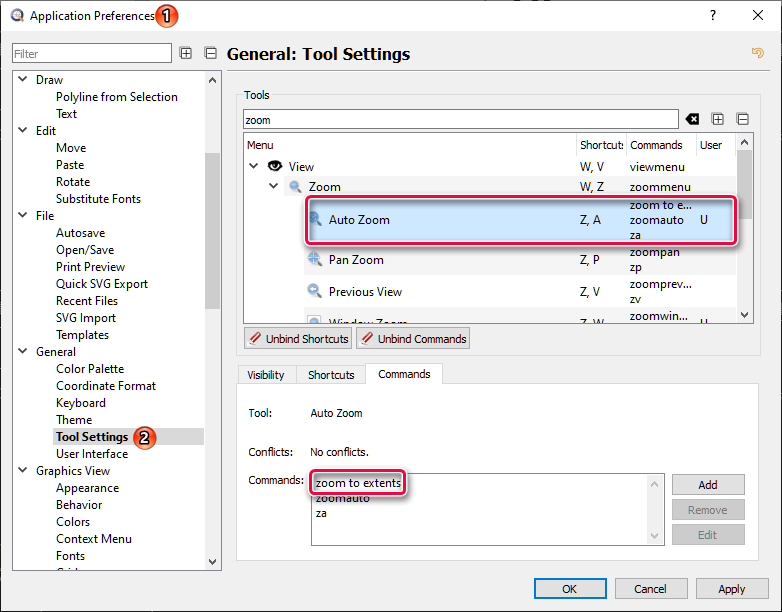
Thanks, yes the tool settings is the solution
It seems illogical / counter productive to me that typing ‘zoom to extents’ would be preferred over typing ‘ZA’.
I also think that no one enters ‘arcconcentricthrough’ but just ‘AG’.
I do understand ‘ZE’ for the given example but that is not user defined.
In the end I foresee unsolvable conflicts with 2/3 letter shortcuts.
Regards,
CVH