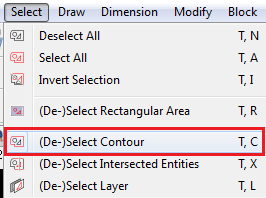
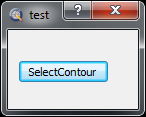
I have this code in the script but there is not reaction when i push the button
TEST.prototype.beginEvent = function() {
…
button = dialog.findChild(“SelectContourButton”);
button.setDefaultAction(RGuiAction.getByScriptFile(“scripts/Select/SelectContour.js”));
…Q1) How can i execute the Select Contour by pushing a button on my dialog, please?
If my dialog is Modal then it blocks input to other visible windows in the same application, therefore i think I should execute my dialog as a Modeless dialog to then select the countour.
If the dialog is modeless then it is possible to open many instances of the same dialog, that’s something I do not want.
Q2) Is it possible to create a singleton instance of a modeless dialog, please?
You can try this instead:
button.triggered.connect(
function() {
var action = RGuiAction.getByScriptFile(“scripts/Select/SelectContour/SelectContour.js”);
action.trigger();
}
);[Edit: correct path to avoid confusion]
I have tried the suggestion but I does not work yet, as i get error:
Uncaught exception at scripts/MyScripts/Test/Test.js:77: TypeError: Result of expression ‘button.triggered’ [undefined] is not an object.
Below is my entire function so far.
Test.prototype.beginEvent = function() {
 MyScripts.prototype.beginEvent.call(this);

 var dialog = WidgetFactory.createDialog( Test.includeBasePath, "Test.ui");

 dialog.show();

 var button = dialog.findChild("SelectContourButton");

 button.triggered.connect( function() {
 var action = RGuiAction.getByScriptFile("scripts/Select/SelectContour.js");
 action.trigger();
}
);
Andrew. Riverbuoy thank you both for your help.
I modifed the fucntion as you correctly pointed out.
I have also fixed the error “TypeError: Result of expression ‘button.triggered’ [undefined] is not an object.”, by changing the button Class from QPushButton to QToolButton.
Unfortunately when pushing the button ther is no reaction yet.
in the Command Line I am expecting that command selectcontour is executed, but no command is displayed.
Is there any other suggestion I shall follow, please?
I can now see the command selectcontour in the Command Line but it appear that it is not executed as the SelectContour.ui widget is not displayed.
Can you get the above widget displayed, please?
I think the problem here is the dialog box. SelectContour uses the current document. I think the dialog box is the current document and not MainWindow, which SelectContour expects it to be. I don’t know how to handle that.
Without knowing exactly what you are trying to achieve, it is hard to know what to suggest.
Is there a reason why you cannot put your command button in the options toolbar? This would also remove the problem of making the dialog modal or modeless.
Do you want a script to pause while the SelectContour command is active? If so, a standard script can’t stop or pause. You would need to write your command as an RGuiAction, (which, going by the ‘beginEvent’ function name, you may be doing so already). All the built in commands are gui actions and put their options in the options toolbar. So again, the best place for your button would be in the options toolbar.
To get a good idea of how to do this, have a look through all the existing scripts (written by Andrew), and see how things are done. Also look to see if an existing script does something close to what you are trying to do, and if it does, then try modifying that script. (That is mostly what I have done.). Also check out QCad’s documentation for the classes to see what methods are available .
Sorry for not being more helpful.
I answer to your question
Q1) Is there a reason why you cannot put your command button in the options toolbar?
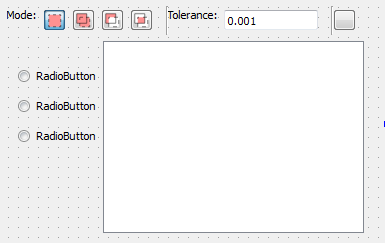
A) in my widget there are some other ui objects as the example below:
In the toolbar all the objects will be horizontally squeezed.
Q2) Do you want a script to pause while the SelectContour command is active?
A2) No, i do not want the script to pause.
i agree, the toolbar would be the most convinient area where to place my widget.
Therefore the problem is how to create toolbar widgets that are not squeezed?
Yes, space on the options toolbar is a problem.
However I notice you are using radiobuttons. As these are usually in a group and only one is active at a time, it might be possible to put the options in a dropdown box. Take a look at ‘Snap->Distance Manual’ where I used a dropdown box to provide the options for distance, percentage or fraction. My first thought was to use radio buttons, but for some commands there wouldn’t be enough space to show the radiobuttons. So instead I used a non-editable dropdown box, and I check the current index to choose how to interpret the value.
Might this be possible?
Yes, I have radio buttons that i could arrange in a dropdown list.
The main problem is a Table where I need to show all the elements of the selected contour, including their corresponding start and end points.
At last i am afraid I would have to arrange this in a dropdown list, but then too many dropdown lists…
if i could increase the size of the toolbar then i could better arrange my user interface.