Version: 3.32.9.0 (3.32.9)
Build Date: May 6 2026
Revision: 65655b9
Qt Version:6.11.0
Architecture: x86_64
Compiler: MSVC++ 14.44 (2022)
Windows 10
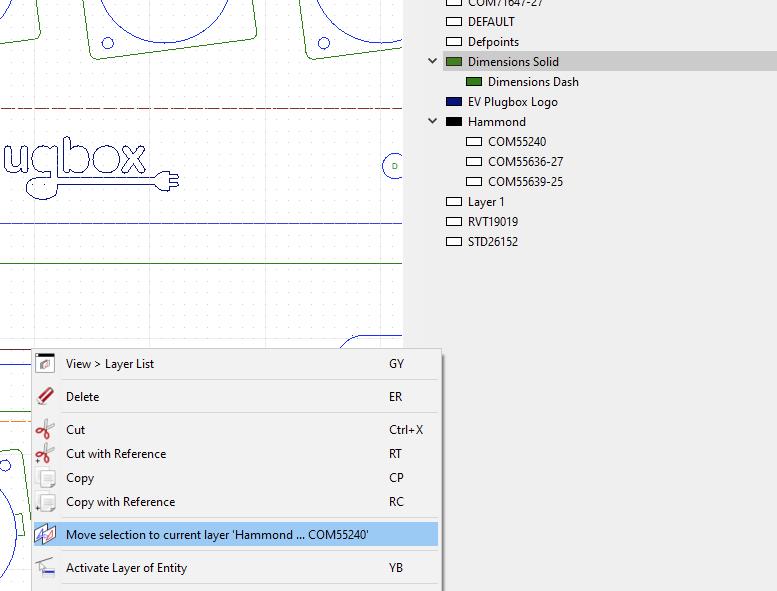
I just updated qCad, and immediately have an off by n error between the Layer List and what layer shows up. Restarting qCad did not make a difference.
I have not tried yet reverting, I need to get a design out.
For any boot of the program, the offset is constant, so I can just select the wrong thing:
I have verified it happens regardless of the dxf file loaded,
and even with a newly created file with just two layers.
Your screenshot does not show us which layer is the current layer. That would be the layer with the pen icon at the right which is cut off in your screenshot.
Note that the highlighted or selected layer may or may not be the current layer. You can also highlight or select multiple layers, for example to delete them all at once or change their properties using the property editor.
If you mean something else, please elaborate what you mean by “off by n” and “what layer shows up”.
By “current layer” I meant the one I clicked on, intending it to be the current layer.
Thanks.
So if you click on “Dimensions Solid” in your layer list, what happens? Which layer is activated, which is selected (dark background)?
Also: are you using a user interface “Theme” by any chance? If so, can you disable it to check if that solves the problem?
I just noticed that your layer list looks different than here (gray background, vs. white here) hence the suspicion about a theme…