I’ve been experiencing issues with the export of filled patterns in DXF files using dxflib. The patterns are not displaying correctly in the recipient CAD software, and I am at a loss as to how to resolve this problem. I have tried various troubleshooting steps, including checking DXF version compatibility, verifying the fill pattern definitions, and adjusting coordinate systems, but the issue persists.
Hi, and welcome to the QCAD forum.
Perhaps have a look at: Fill a solid circle with QCAD dxflib [Solved] - dxflib Suggestions and Feedback - QCAD Forum
And all linked.
Exporting to AC1015 format?
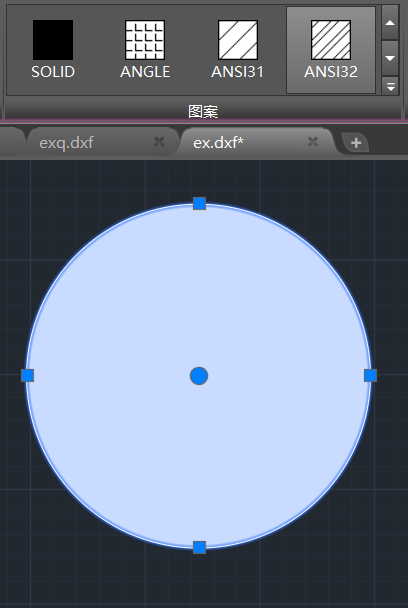
If the selected circle is hatched with ANSI32 then I suspect that the scale is too small making it look filled as solid.
Regards,
CVH
I tried adjusting the scale, which was originally 1, and changed it to 1, and then the display became normal.。It’s not normal when I open it, but it will show normally after I switch the pattern.
yes,AC1015
Your best option is probably comparing the dxflib export with a DXF saved by QCAD containing a circular hatch textual.
I suspect that the hatch records should match.
I am not aware what the target application does when you force scale = 1.0 …
It could be that the hatch is regenerated over new and then all would be OK of course.
Changing a property with the QCAD GUI has mostly no effect when the difference is too small or zero.
In one of my replies in the linked topic I point out that I don’t know what the trailing parameters are for.
DL_HatchData data(1, true, 1.0, 0.0, pattern, 0.0, 0.0);
Perhaps you could share the code that constructs the circular hatch and Andrew can have a look at it.
Or contact him directly.
Report back when solved … That could be helpful for other dxflib users. 
You should be aware of dxflib licensing agreements: QCAD - dxflib
Regards,
CVH
When I open the file with QCAD, it shows solid fill. Why is this
As in my reply above …
Perhaps you could attach code, an example file, a corrected file by the source application …
Without, we can only try to guess what could be the issue.
I also think that QCAD or the other application will fall back on SOLID filled when there are errors.
Or without the required hatch pattern installed or a virtual copy in the DXF file.
Although the linked topic was tagged as ‘SOLVED’, I did find an invalid hatch in the returned DXF file.
Regards,
CVH
DL_HatchData hatchData(1,false,100,0,“ANGLE”);
std::vector<std::vector<DL_HatchEdgeData>> loopDatas;
std::vector<DL_HatchEdgeData>loop;
DL_HatchEdgeData edgeData1(0, 0, 100, 0, M_PI, true);
DL_HatchEdgeData edgeData2(0, 0, 100, M_PI, 2*M_PI, true);
loop.push_back(edgeData1);
loop.push_back(edgeData2);
loopDatas.push_back(loop);
Rather different from: qcad/support/examples/dxflib/main.cpp at master · qcad/qcad · GitHub
I don’t see you end the loop, end the hatch …
Regards,
CVH
void WriteToDxf::WriteHatch(const SGObjHatch* hatch, DL_Dxf& dxf, DL_WriterA* dw)
{
if (hatch == nullptr)
return;
DL_HatchData hatchData = hatch->getDL_HatchData();
DL_Attributes attributes = getDL_AttributesFromSGDrawBaseObj(hatch);
dxf.writeHatch1(dw, hatchData, attributes);
std::vector<std::vector<DL_HatchEdgeData>>loopData;
loopData = hatch->getLoopData();
for (int i = 0; i < loopData.size(); i++)
{
std::vector<DL_HatchEdgeData> loop = loopData_;
// Write hatch loops:
DL_HatchLoopData lData(loop.size());
int type = loop[0].type;
int curveSize;
AnyCurve2d polyLine;
if (type == 0)
{
polyLine = hatch->calLoop(loop);
curveSize = polyLine->curveCount();
lData.numEdges = curveSize;
}
dxf.writeHatchLoop1(dw, lData);
// Write hatch loop edges:
for (int k = 0; k < loop.size(); k++)
{
DL_HatchEdgeData shape = loop[k];
// line:
type = shape.type;
if (type == 0)
{
for (int i = 0; i < curveSize; i++)
{
LineSegment2d line = dynamic_cast<LineSegment2d*>(polyLine->getBoundCurve(i));
Arc2d* arc = dynamic_cast<Arc2d*>(polyLine->getBoundCurve(i));
if (line != nullptr)
{
Point2d startPt = line->startPoint();
Point2d endPt = line->endPoint();
dxf.writeHatchEdge(
*dw,
DL_HatchEdgeData(startPt.x(),
startPt.y(),
endPt.x(),
endPt.y()));
}
if (arc != nullptr)
{
Point2d center = arc->getCenter();
double radius = arc->getRadius();
dxf.writeHatchEdge(
*dw,
DL_HatchEdgeData(center.x(),
center.y(),
radius,
arc->getStartAngle(),
arc->getEndAngle(),
arc->isAntiClock()));
}
}
break;
}
if (type == 1)
{
dxf.writeHatchEdge(
dw,
DL_HatchEdgeData(shape.x1,
shape.y1,
shape.x2,
shape.y2));
}
// arc:
if (type == 2)
{
dxf.writeHatchEdge(
dw,
DL_HatchEdgeData(shape.cx,
shape.cy,
shape.radius,
shape.angle1,
shape.angle2,
shape.ccw));
}
// full circle:
/QSharedPointer circle = shape.dynamicCast();
if (!circle.isNull()) {
dxf.writeHatchEdge(
dw,
DL_HatchEdgeData(circle->getCenter().x,
circle->getCenter().y,
circle->getRadius(),
0.0,
2 * M_PI,
true));
}/
// ellipse arc:
if (type == 3)
{
dxf.writeHatchEdge(
dw,
DL_HatchEdgeData(shape.cx,
shape.cy,
shape.mx,
shape.my,
shape.ratio,
shape.angle1,
shape.angle2,
shape.ccw));
}
// spline:
if (type == 4)
{
dxf.writeHatchEdge(
dw,
DL_HatchEdgeData(shape.degree,
shape.rational, // rational
shape.periodic,
shape.knots.size(),
shape.controlPoints.size(),
shape.fitPoints.size(),
shape.knots,
shape.controlPoints,
shape.fitPoints,
shape.weights,
shape.startTangentX,
shape.startTangentY,
shape.endTangentX,
shape.endTangentY
/Geometry2dUtils::radToDegree(shape.startTangentX),
Geometry2dUtils::radToDegree(shape.startTangentY),
Geometry2dUtils::radToDegree(shape.endTangentX),
Geometry2dUtils::radToDegree(shape.endTangentY)/
));
//std::vector<DL_HatchEdgeData>splineData;
//splineData.push_back(shape);
//AnyCurve2d spLine = hatch->calLoop(splineData);
//if (spLine == nullptr||spLine->curveCount()==0)
// continue;
//BezierCurve2d bezierCurvePtr =dynamic_cast<BezierCurve2d>(spLine->getBoundCurve(0));
//BSpline2d spLinePtr=nullptr;
//if (bezierCurvePtr == nullptr) {
// spLinePtr = dynamic_cast<BSpline2d>(spLine->getBoundCurve(0));
//}
//else {
// std::vector < Point2d > vecPts=bezierCurvePtr->getInterpolatePoints(20);
// int size = (int)vecPts.size();
// if (size < 2)
// return;
// Vector2d vStart = vecPts[1] - vecPts[0];
// Vector2d vEnd = vecPts[size - 1] - vecPts[size - 2];
// spLinePtr = new BSpline2d(vecPts, vStart, vEnd);
//}
//
//if (spLinePtr == nullptr)
// continue;
//
//Vector2d startTangent = spLinePtr->getStartTangent();
//Vector2d endTangent = spLinePtr->getEndTangent();
//std::vector fitVec=spLinePtr->getFitPointVec();
//std::vector controlVec=spLinePtr->getControlPointVec();
//std::vector knotVec=spLinePtr->getKnotsVec();
//std::vector weightVec=spLinePtr->getWeightVec();
//std::vector<std::vector >controlVecd;
//std::vector<std::vector >fitVecd;
////knotVec.clear();
//for (auto& pt : controlVec) {
// std::vector tempVec;
// tempVec.push_back(pt.x());
// tempVec.push_back(pt.y());
// controlVecd.push_back(tempVec);
//}
//for (auto& pt : fitVec) {
// std::vector tempVec;
// tempVec.push_back(pt.x());
// tempVec.push_back(pt.y());
// fitVecd.push_back(tempVec);
//}
//dxf.writeHatchEdge(
// *dw,
// DL_HatchEdgeData(shape.degree,
// shape.rational , // rational
// shape.periodic,
// knotVec.size(),
// controlVec.size(),
// fitVec.size(),
// knotVec,
// controlVecd,
// fitVecd,
// weightVec,
// Geometry2dUtils::radToDegree(startTangent.x()),
// Geometry2dUtils::radToDegree(startTangent.y()),
// Geometry2dUtils::radToDegree(endTangent.x()),
// Geometry2dUtils::radToDegree(endTangent.y())
//
// ));
}
}
dxf.writeHatchLoop2(*dw, lData);
}
dxf.writeHatch2(*dw, hatchData, attributes);
}_
Are there any errors in the above?
Please put long code in a code panel with the [</>] button.
Now it took some time to re-format the text before it was readable to me.
I am not a specialist on this matter and C++ looks a bit different than JS
From your code I presume that the circular boundary is not exported as a full circle.
That part is ruled out.
The origin is thus the first part of your code and I presume this is intended to export polyline edges.
For a single polyline because the edges loop is terminated with a break afterwards.
There is also something about Arcs in DXF.
It is clear that RDxfExporter diversifies between reversed or not:
I have a problem with understanding:
- cycling loopData with i but the index is not used.
- cycling loop = loopData with k
- cycling curveSize nested but again with i
For the rest I can’t detect anything wrong but again, I am not a specialist on this matter.
Also discovered what the trailing parameters stand for.
They define the pattern origin, a most important feature for patterned hatches.
Presumed it but it is not explained as such in the reference:
Regards,
CVH
Thank you for your reply, you gave me a lot of tips and help