louis
June 11, 2020, 7:32am
1
Hello,
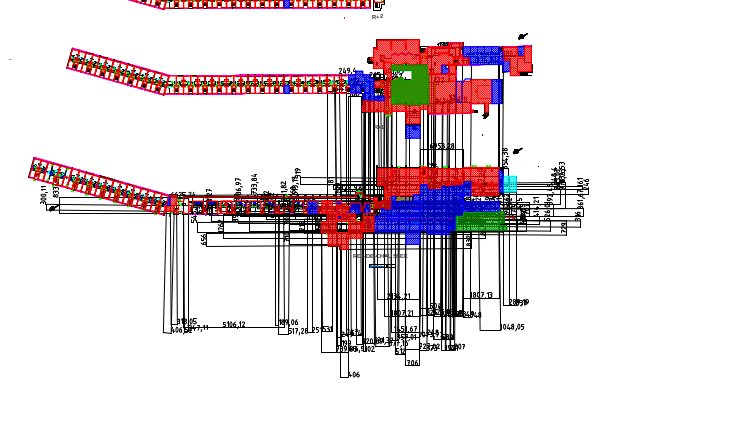
See DWG file and a screenshot below. Do you have any idea how to do this with command line ? Which option ?
If anyone has the answer I would be thankful
Debian 10ANGLET Ensemble des niveaux RDC à R+7.dwg (1.79 MB)
from the menu Edit>Drawing Preferences click on Dimension Settings in the dialog box, then set the Arrow size field to 0, click on Apply
louis
June 11, 2020, 8:46am
3
Hello,
andrew
June 11, 2020, 8:50am
4
Just to be clear: are you looking for a way to remove (delete) all dimension entities from the drawing?
andrew
June 11, 2020, 8:56am
7
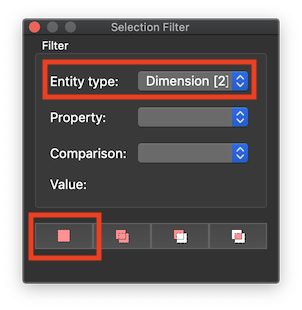
View > Selection Filter
Then hit the Delete key or choose
Edit > Delete .
Husky
June 11, 2020, 8:58am
8
@louis
Please note that QCAD is a 2D program. Your drawing has Z values all over the place. I assume it is converted from a 3D drawing.
louis
June 11, 2020, 9:07am
9
Ok thanks, so I think it’s impossible to do that with command line ? Or to keep all layer expect layer with name X or Y ?
I’m sorry I’m a developper I don’t have any skills with this software, be understanding with my strange question
andrew
June 11, 2020, 9:12am
10
Not out of the box. Using the QCAD script interface, you would have to create a command line tool that does that.
See also:
louis
June 11, 2020, 9:17am
11
Ok thanks for your answers !
CVH
June 11, 2020, 9:47am
12
Has this question relevance with removing all dimensions (167 on rdc-cotation).
Then I would:
Regards,
louis
June 11, 2020, 3:24pm
13
Yes I see but I need to used command line