Hi FYI.
qcadproxies.dll needs also to be removed !!!
Hi,
The list in the related topic Removing the Trial Add-Ons is indeed incomplete.
Issued on Fri Jan 13, 2017 and probably not updated meanwhile.
This issue is already mentioned several times.
The topic is locked and as QCAD users, as QCAD forum members, we can not update, comment or reply to that.
At present this dialog is presented on Windows when you want to revert to QCAD CE.
That lists 2 extra DLL files to be removed.
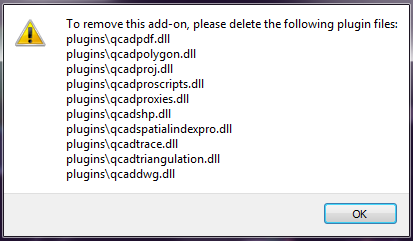
Regards,
CVH
The content of the related locked topic was rephrased by Andrew. 
A list on the QCAD CE forum was practical when QCAD is not running.
Or when you merely downloaded the package of a new release.
Plugins can be removed/renamed when QCAD is running.
I must add that I have no trial packages installed under C:\Program Files using Windows.
After the limited trial interval or limited number of sessions another dialog would pop up.
That was the reason I took a screen capture as PNG, updating it on regular base. 
If considered as solved, please add [SOLVED] to the title of your initial post by editing it.
Regards,
CVH
I realize this is an old topic but I’m just now facing up to it. I had to search to find what to remove and finally found this thread. My trial version just timed out and presents another problem- once beyond the trial period I couldn’t find any way to even click on the REMOVE button, when I open qcad I immediately get a popup that prevents me from clicking the button, when I click OK on that one I get another popup and then it closes the program. Well if I can just delete some files I could do that. Qcad itself couldn’t give me the list but I found it here. The other problem is a problem of permissions- I can’t manually delete the files. I don’t often have to deal with permission issues in Windows but I can probably figure that part out. I think all of this information could be better presented on the qcad website or in the readme files in the trial installation, for that matter qcad could just delete the files itself.
Hi,
No, QCAD can not delete the files that are stored under the ‘Program Files’ folder by itself.
This section of the drive is guarded by the Windows UAC.
You need at least Admin rights to remove/rename these files.
Not loading these plugins at startup …
… all depending on a flag could be an easier solution.
It’s unsure if the above list is still up to date.
Currently such a list is displayed when you would be able to hit the REMOVE button.
On Windows any dialog is modal, meaning that you can not reach that button.
I would advice you to buy a QCAD professional licence.
Even for a retired structural engineer the small fee should not be a big hurdle.
In perspective: It is a perpetual license and for less than 1 EURO per week you have one year of access to updates. There is no need to update if it is functional ‘as is’.
Even then you received a deduction code to renew your licence and the access to new updates.
Another option is not to use the msi installer.
Just expand a zip package to anywhere you like and run QCAD from there.
Scroll down on the ‘QCAD Downloads’ page.
Reset your configuration before re-installing if you are happy with that.
See: QCAD - Tutorial: Resetting the QCAD Configuration
Regards,
CVH