I’ve just started to evaluate the pro version using the trial. I am using QCAD to design a kite. 80cm X 600cm. Enjoying the software at the moment.
The plan is to finish the design and send to a printing company to print out on a series of A0 landscaped plotted pages (Multiple columns all on the same row). I can then join all the pages and cut out the pieces to use as a template for cutting ripstop.
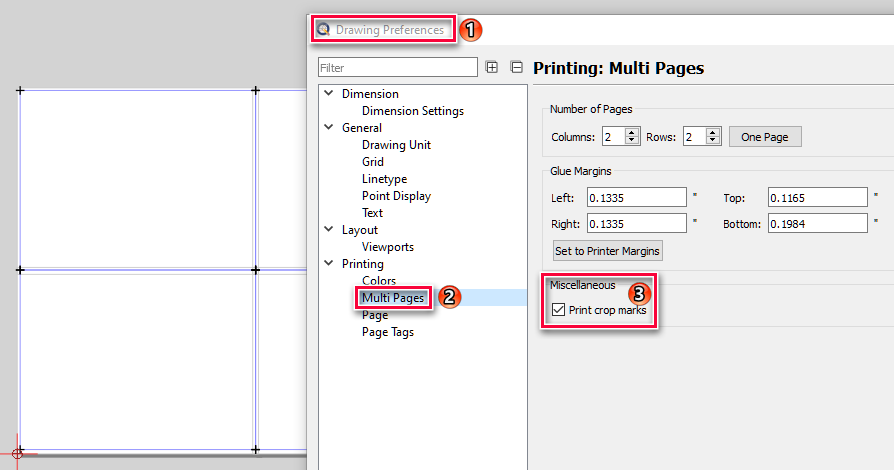
I’ve got an A4 laser printer and I’ve been doing some testing with a simple 15 X 50cm design spanned over 3 sheets of A4 I’ve added the page tags + crop marks. Glue margins are set to 10mm left and right.
The issue I have is my laser does not support margin less printing and I’d need to find out if the external printing company offers this as an option. With the additional margins It’s impossible to line up the various pages to ensure the overlapping shapes are the right size. I can stick a pin through each of the crop marks but then I have an additional margin which makes the shape incorrect size.
The only option appears to get a guillotine and cut the margins off so everything lines up. Not easy with A0 though!
Am I missing something obvious here? how do others usually print and line things up?
the other risk here is using a 3rd party printing service, whether the measurements get printing accurately as no way to calibrate.
The idea of the crop marks is that each page’s crop marks are exactly aligned with the next page’s crop marks. You could for example hold the pages against a window to exactly align the crop marks. For example, the two leftmost crop marks of page two need to be on top of the two right crop marks of page one if pages are besides each other, etc.
If your printer cannot print all the way to the edge, you will get a margin (e.g. 10mm) of empty space. However, the drawing / shape will be accurate, there’s just a small gap in it. To avoid the gap, you would indeed have to trim the paper at the crop marks.