Hello, new to this forum, I use qcad for personal use, mostly as a hobbist. I normally use the community edition but also have tried the Pro version.
I found what يبدseems to be a regression introduced between QCAD 3.32.6 and 3.32.7.
Some DXF ASCII drawings that open correctly in QCAD 3.32.6 become unusable in 3.32.7 and later (tested also with 3.32.9, both the community and PRO versions):
the drawing appears empty,
Auto Zoom produces astronomically large extents,
dimensions shown in the margins/status area become absurdly large.
The DXF files themselves do not seem corrupted:
coordinates in the file are normal,
no obviously huge values or scientific notation values are present,
opening the same files in 3.32.6 works correctly.
Interestingly, after opening the file in 3.32.7/3.32.9, if I change drawing units from meters to centimeters and back to meters (Edit → Drawing Preferences → Units), the drawing becomes visible again temporarily. However, Auto Zoom immediately breaks the view again and the huge extents return.
This strongly suggests a problem related to extents / bounding box calculation or unit scaling introduced in 3.32.7.
I am attaching a minimal DXF example that reproduces the problem.
Or, if you are comfortable with DXF, you can edit the DXF file (plain text) directly.
What has changed?
QCAD < 3.32.7 ignored such extreme coordinates as invalid. However, there appear to be CAD drawings that are actually using such values, so QCAD >= 3.32.7 accepts these to a certain degree.
IMHO
Values stored textual in DXF with 27 significant decimal digits are bogus.
At best a 64bit double has approx. 15-17 significant decimal digits.
Disregarding a 10-based exponent.
I even suspect that the binary DWG format doesn’t allows this.
A next question is: How did they ever be recorded as such?
What Andrews means is that the isSane() test was stripped from not over +/-1e12 checks.
Meaning that all values that are not NaN or infinite are now considered to be SANE.
I said that I could prove him wrong but it now seems that I don’t have to
The so-called fix was introduced because of this report:
3 million kilometers is roughly 8 times the distance from the Earth to the Moon … There are no (round) buildings out there to place a chair (About 500 by 500mm) in.
I suspect that somewhere in the drawing file creation process the unit point (1/72") was used.
The values are then 185771 larger than in the drawing file unit.
CAD does not support the unit ‘points’, other apps might.
Still, QCAD was adapted to serve this user needs.
Another problem is the accuracy at those distant positions.
Everything within an amount of meters is exactly the same spot.
Is within 1e-9 distance (RS.PointTolerance) or any other tolerance check is always true and thus meaningless.
How the fix is implemented is also debatable.
RMath::isSane(double v) was reduced to RMath::isNormal(double v) and no longer clamped in the range (-1e12, 1e12) excluding +/-1e12.
It is then illogical to say that ‘isNormal — was an identical copy of isSane; now delegates to it.’
See: bug fixes, clean up · qcad/qcad@98c5cfa · GitHub
In fact, it should be isSane() that delegates to isNormal().
Extreme coordinate values can be considered as normal (Not Nan and not Infinite)
But IMHO they are not sane at all.
The problematic 16 lines are 1.56 long lines on layer ‘0’ with custom color ‘blue’.
8 starting at X-48.8472202268296982 and ending at X-47.2872202268297031
8 starting at X0 and ending at X1.5600000000000001
About 12,55.. spaced in Y.
Typically the third digit, a 1 to 8, is repeated 13 to 14 times.
Looks more like a DXF textual value formatting issue on export.
Your drawing looks rather correct if you:
Replace the first 12 repeating digits (1-8) by a decimal point.
Discard the decimal point and the zero at the end.
For all 32 textual entries in the DXF with a plain text editor.
I have also set all 32 positions to Z-123 (DXF code 30 and 31).
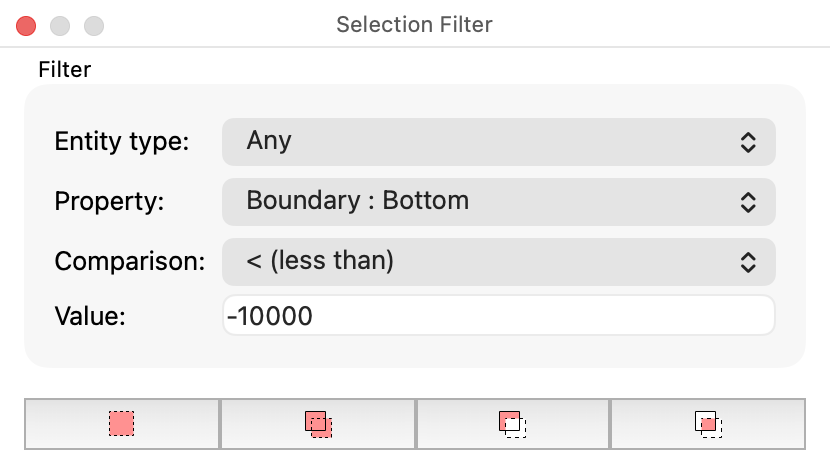
It is a pity that a standard Pro user cannot use the selection filter to filter by Z.
Neither can a CE user.
Thanks a lot to all.
I’ll see the details at home (now I am at work). I found a sort of workaround copying the draw to a new empty file from the qcad. However, I wonder if some sort of sanity check should be implemented. I can assure that the file was created and modified only using version 3.32.6 of qcad, and that I never intended to draw anything of cosmic proportions, so I totally ignore how those extravagant values ended in the dxf file …
Basically, it is the sanity check that was removed.
Otherwise these entities were dropped on import.
If QCAD exported these DXF values then there is a export value formatting issue.
CE, thus with the dxflib R15 export module or in another core resource.
It can also be Qt6 related, you didn’t mentioned that.
Since you mention that it might be a Qt6-related issue (I guess you mean how those extravagant values were added), I only can say that the faulty file was created using the qcad 3.32.6 community edition as compiled for Artix Linux against qt6; it is actually distributed without the qt6 libraries, and relies on the system’s qt6 libraries. As I do not know at which step the cosmic numbers were inserted, I would not be able to reproduce the whole process using a Qt5-compiled version of qcad 3.32.6 to test if it is somehow Qt5/Qt6-dependent.
In any case, since legacy dxf files may be arround with (previously unnoticed) abnormal values, maybe the sanity check could be restored. Or, a config flag added for those using qcad to draw plans for a Mars spatial stations requiring to be correctly situated with respecto to the Earth.
In any case, qcad is a wonderful toll. Regards and many thanks,
Ricardo.
Hi,
In any case I would download the QCAD Trial application from the official site.
You are not limited to the recommended packages, scroll further down on this page.
Install and then remove the Pro trial plugins:
Porting to Qt6 is an ongoing process and is said to be stable since a short while.
From the few reports on the new Discource forum I can only deduct that there are still some issues.
I don’t think that the Artix maintainer did a better job than Andrew himself.