QCAD Pro 3.29.6.0
Win 10 /x86_64
(Newbie here)
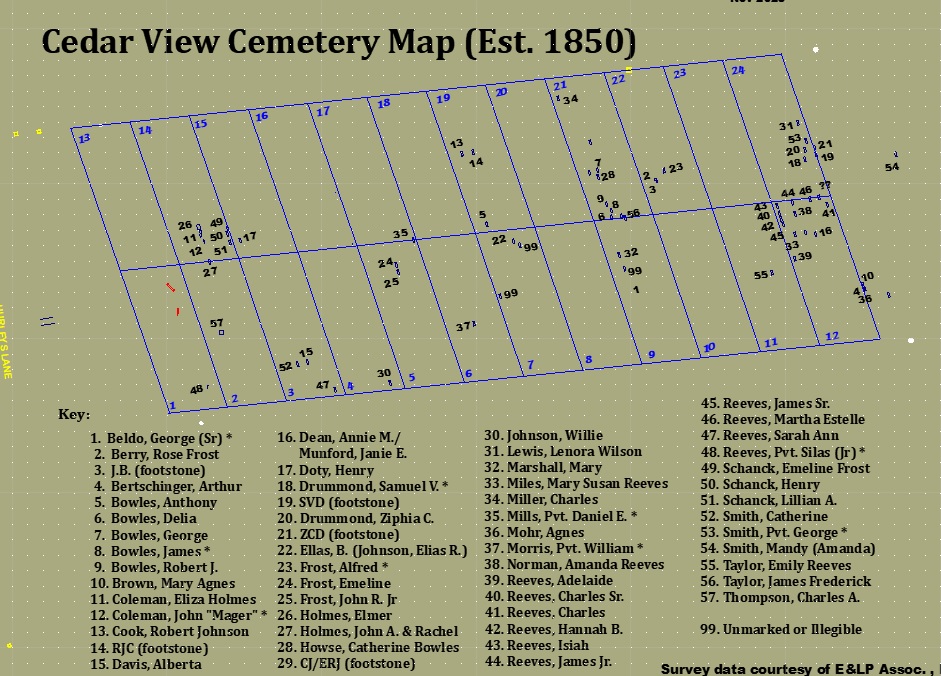
I’m using QCAD to produce a cemetery map for a historic cemetery. I was able to procure survey data from survey company
in form of a .DXF file. I turned off many layers which weren’t needed and added perimeter and lot boundaries. In addition I’ve added
headstone name text and “keys” within cemetery and added a background colour (see attached screen capture). When I use PDF export
I lose background colour (and lot lines display differently). (see attached PDF). Is this the way it should work and if so how can I include
background colour in PDF export?
Any suggestions?
Cedar View Cemetery - 0122019-25Sep25.pdf (54.7 KB)