When I try to open a dwg drawing I get the error message “Cannot open file. Import failed”.
Operating system “Windows 11 Home”
QCAD version 3.28.2.0 (3.28.2)
026594003-AE-DW-E0001BL-Sketch-23.dwg (450 KB)
The file you have attached is a PDF file that has been renamed from .pdf to .dwg.
Please understand that changing the file extension from .pdf to .dwg does not convert the PDF file to a DWG file - it will still be a PDF file, just with a wrong name that makes it impossible to be identified as PDF.
If you name it back to .pdf, you can actually open it using the PDF import of QCAD.
ralphsegar, welcome to the QCAD forum.
Importing of the renamed file might fail using QCAD 3.28.2.0 as it does with QCAD 3.27.x
The preview dialog remains empty and no geometry is imported after acknowledging the dialog.
All without a warning in the Command History.
Your best option is to update QCAD. 
The renamed file can be imported using the latest release of QCAD (3.32.4.0)
Unable to locate at what point importing a PDF like this one was fixed … 
Andrew,
Canceling the import dialog results in the warning: Error while importing file abc.pdf
It seems that QCAD does not diversify between canceling the dialog and a successful or failed attempt.
With only true/false the (best suited) file importer cannot signal back that the action was canceled by the user.
RDocumentInterface has no specific IoErrorCode for this case.
Regards,
CVH
CVH: I cannot confirm that. Importing the file once renamed works fine here, even with QCAD 3.28.2. Perhaps the file was locked on your system because it was already open with another Windows application.
I only presumed that because using 3.27.6 or 3.27.8 an empty dialog is shown (Win7):
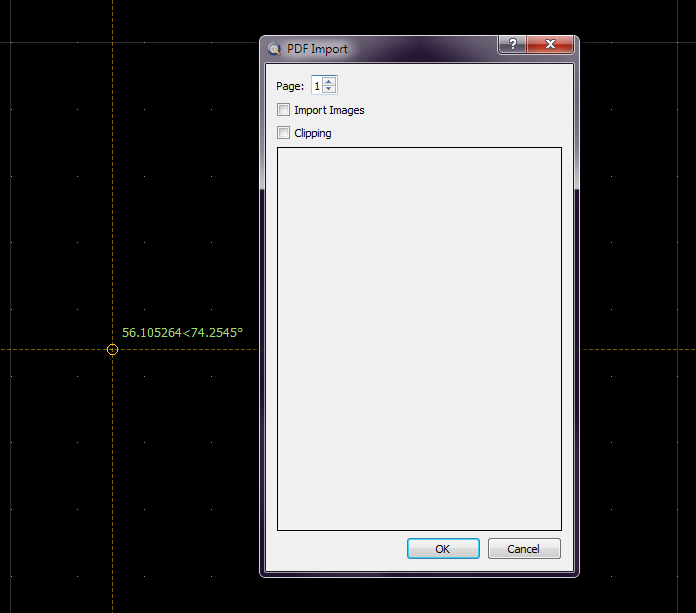
It may relate to the content because PDF files exported by QCAD don’t have that issue.
Windows shows indeed a preview of the PDF in the (system) file dialog when selected but that doesn’t lock the file.
That also doesn’t prevent QCAD trial 3.32.4.0 to show a preview in the QCAD import dialog.
Even with the file open in Abobe Acrobat Reader a preview in the QCAD 3.32.4.0 import dialog is shown.
In such a case I would not be able to overwrite the file. (Locked for writing)
For example when that was exported by QCAD and I would like to renew that with a newer export.
Even not fixed with closing Abobe Acrobat Reader but solved by restarting QCAD afterwards.
For known reasons (Show property buttons) I don’t have QCAD versions installed beyond an essay of 3.27.8
Except a few of the most recent releases where that issue should finally have been solved.
But these exhibit odd mouse wheel navigation in/after some situations.
Regards,
CVH