Older QCAD files have the dimensions corrupted

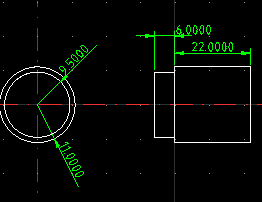
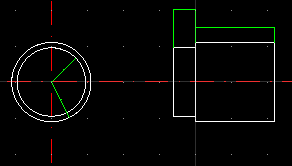
I needed to access some older QCAD files and saw that the dimension entities had lost their arrows and text values (completely missing. With an older QCAD version (and OS), they appeared correctly.

Old QCAD is version 3.23.0.0 on OpenSUSE 15.3:


new QCAD is version 3.30.1.0 on OpenSUSE 15.4:

Screenshots attached. Is there a solution?
Regards,

Bob

Hi,

Can it be a Dim size issue?
Text too small and including the arrow size I presume proportional.
Perhaps see Drawing Preferences.

Regards,
CVH

Sadly not, I’ve tried all those obvious things.
Thanks anyway.

Perhaps you can attach an example file. How to attach files
A snippet will do. :wink:

Regards,
CVH

Here’s the QCAD dxf file of the above screenshots:
UUT.dxf (19.1 KB)

I’ve copied the older QCAD to the newer OS, it works fine, so I can discount the OS version.

UUT.dxf (R24) Loads with showing the dimensions over here.

Just as old-dwg.png … Old QCAD is version 3.23.0.0 on OpenSUSE 15.3:

With other words:
I don’t see the issue … Using QCAD Pro

Regards,
CVH

Oh! Then my newer QCAD must be somehow broken.
Thanks, I’ll chase this.

OK, I downloaded the latest Linux version (3.31.2.0) and my file was shown correctly.
However, I wanted the community edition, so I removed the 10 plugin files as per the “Remove” instructions. Then the dimension fault appears.
Bob

Hi,

I still think it is a Style issue … Pro only
Introduced near the end of 2021.

Perhaps filing a bug report on the 3.31.2 CE Dimension bug for old files is in order.
See QCAD Bugtracker

Regards,
CVH