I just installed QCAD (Version 3.32.2.0 (3.32.2)) on my PC (Windows 10).
The Options Toolbar does not display. The options toolbar is checked in the drop down menu.
Is there a solution?
Lary
Hi,
What happens when you start a tool?
Try for example ‘Line from 2 Points’ (LI).
It should be made visible by default.
It is dynamically adapted to the current active tool(s), by default that is ‘Reset / Idle’ or ‘None’.
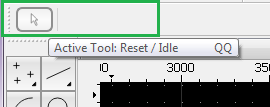
Regards,
CVH
Line from two points?
I get and infinite line.
Lary
Probably because the LI tool is configured to produce endless lines.
On activating LI the Option Toolbar should dynamically update to:

First icon is always the tool icon of the currently active tool.
Next 3 buttons are the line modes, activate the segment mode.
Hold your cursor steady over one of the buttons and a Tooltip is displayed.
Regards,
CVH
CVH,
My toolbar only shows the first icon (the arrow).
There are no other icons displayed.
How do I get the toolbar to display the additional icons?
Lary
Hi,
The toolbar should adapt when starting a tool that has options to display.
At least the first icon would display the icon of the currently active tool.
Even when hidden, the Options Toolbar will always be made visible on starting a tool.
Regards,
CVH