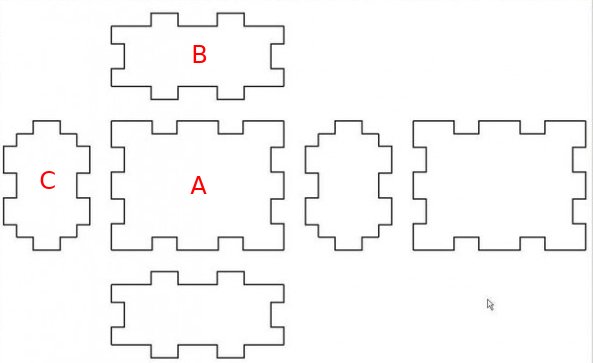
From the layout, it can be easily be seen and checked that A and B line up, and A and C line up. But how do you know B and C line up? What I normally do is make a rotated copy of C, put it next to B and check or add guidelines connecting the 2 pieces. But for most box designs I’ve tried, which are more complex and with many more pieces than this example, I end up making so many copies and guidelines it gets messy. I’m not sure this is a good way to go about it. I’m looking for some kind of method to keep track of alignment visually.
I know there’s a 45 degree line thing you can do to rotate dimensions. I also know you can use the IP tool to see measure and see if 2 things have the same X or Y coordinate. But they aren’t always applicable. I reckon there’s also conditionals, so perhaps conditional formatting can be used to change the color of certain entities if things don’t correspond or something like that? There must be many techniques. There must be a method. Something that allows you to lay out the plans for a design like #10 on this page and check for the alignment of any two pieces as seen from any of the 6 views without errors:
