Hello,
how can i set the preferences in the Cam Profile Toolpath Menu?
thanks
Matura
Unfortunately, I don’t understand your question. Please elaborate, include screenshots, etc., thanks.
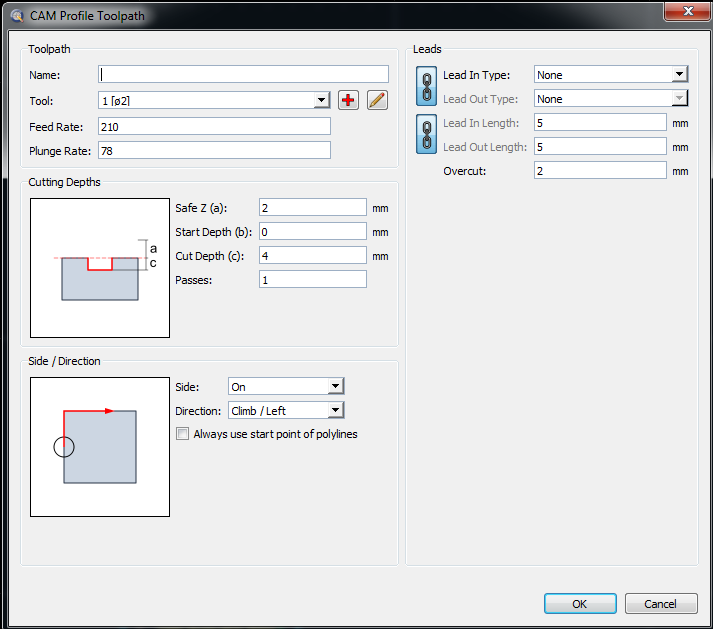
Changing the default values is possible, yes.
Please indicate which post processor you are using, so we can assist you efficiently, thanks.
Hello Andrew,
iam using an adapted Gcodeoffset [mm] postprocessor.
thanks
Matura
You can override initDialog in your post processor and change the default values, for example:
GCodeOffsetMM.prototype.initDialog = function(dialog, di, resourceBlock) {
    // adjust profile toolpath dialog:
    if (dialog.objectName==="CamProfileToolpathDialog") {
        // change default cutting depth:
        var leCuttingDepth = dialog.findChild("CamZCuttingDepth");
        leCuttingDepth.setValue(20);

        // change default side:
        var cbSide = dialog.findChild("CamSide");
        cbSide.currentIndex = 0; // 0: none, 1: outside, 2: inside

        // change default direction:
        var cbDirection = dialog.findChild("CamDirection");
        cbDirection.currentIndex = 0; // 0: Left, 1: Right
    }
};
You can find more control widget names in the attached user interface definition file (XML).
CamProfileToolpathDialog.ui (21.8 KB)
Hello Andrew,
thanks!
regards
Matura
Hello,
I managed to set the default values for some of the fields in this dialogue window, thank you for sharing the ui file allowing to find the widget names.
I am however unable to modify the combobox items , namely the side/direction comboboxes.
In the solution you provide you suggest the following:
var cbSide = dialog.findChild(“CamSide”);
cbSide.currentIndex = 0; // 0: none, 1: outside, 2: inside
however, this doesn’t seem to work: the combobox stays on its default (0) value whichever value is set in the script overriding.
From the Qt documentation on QComboBox I gathered that we should rather call the member function setCurrentIndex(int index) as currentIndex is just a member variable accessor. I have therefore tried he following:
cbSide.setCurrentIndex(2); // 0: none, 1: outside, 2: inside
in order to set the “inside” option by default. This unfortunately does not work either. Could you provide a hint to why that is or perhaps a solution?
Than you
L.
Hi,
Both should be valid:
cbSide.currentIndex = 2;
cbSide.setCurrentIndex(2);
We can find a mix of the two methods throughout the QCAD scripts.
The questions remains if:
A) var cbSide = dialog.findChild(“CamSide”);
Returns a widget … Maybe the UI file has changed since Jun 2021 …
If the variable cbSide holds something isn’t tested … 
B) cam.js doesn’t override it again.
Regards,
CVH
Hello,
Any update on this? I am not able to change offset side via this code inside my .js post processor file, and it looks like that is where this thread stopped…
Code for default values in the Camprofiletoolpath dialog box starts at line 310 in the js file attached…
…
// change default side:
var cbSide = dialog.findChild(“CamSide”);
cbSide.setCurrentIndex(2); // 0: none, 1: outside, 2: inside
…
Looks like I am having luck with Safe Z, cutting depth, and overcut, so it’s a start. 
Also, I am interested in changing default values in the CamDrillToolpath dialog box, but I don’t know where to start.
Windows 11
Qcad version 3.27.8.0
Thank you kindly.
GCD.js (13.7 KB)
Hi,
I managed to export the CamDrillToolpathDialog a while ago:
Indeed this thread stopped with 2 unanswered questions.
Meanwhile I opened a feature request to include a GroupCustom widget in CAM Toolpath dialogs.
Regards,
CVH
Hello,
thank you for those two links. A custom widget to edit these would be fantastic.
In the mean time, I made a quick AHK script to cycle through all of the fields and throw in some default values.
That file is attached if anyone wants to gander and tweak for their personal preferences. You’ll need to change the extension to .AHK and have AHK installed.
Regards,
CamDrillToolpath.txt (1.74 KB)