Hi all,
Sorry if this has already been asked. I’m trying to copy the projection symbols into the title block I’ve built and seem to be struggling to get his to happen. Please can someone help?
This is what i need to add in
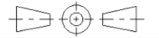
Thank you all.
Dave E
Hi all,
Sorry if this has already been asked. I’m trying to copy the projection symbols into the title block I’ve built and seem to be struggling to get his to happen. Please can someone help?
This is what i need to add in
Thank you all.
Dave E
Hi,
Block content is added while editing the Block definition itself.
Select and Copy or Cut your design probably drawn in the Model-Space Block.
For example Copy/Cut ‘with reference’.
Edit the title Block and paste the copied/cut content there.
E.g. double-click on the Block name in the Block List or select it and then Edit Block (BE)
Activate Model-Space back afterward (EM)
Regards,
CVH