Hi All
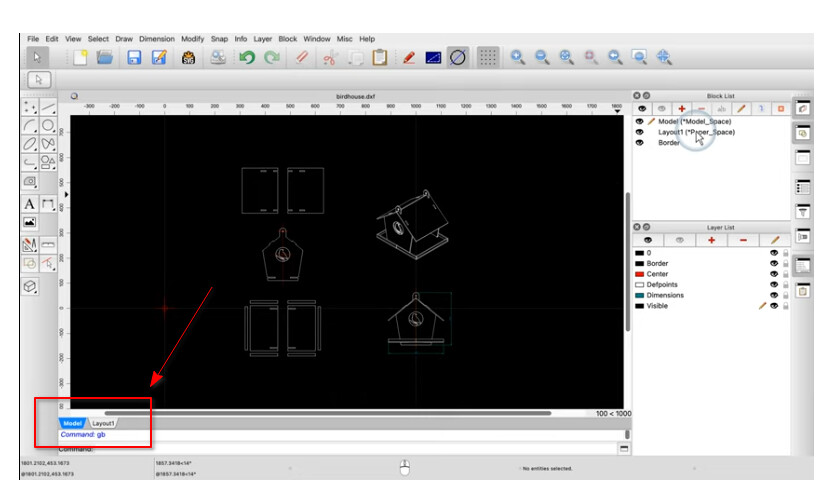
How can I show the Model & Layout Tabs as Shown in the Qcad Video Screenshot Below?
Running Linux Mint 22 64bit
Qcad/CAM 3.32.0.0
Also tried in Windows with no luck..
Cheers
John
PS It’s not a deal breaker, just would be a “nice to have” 
Hi John,
right now only experimental available 
Cheers!
Thanks Husky 
John,
Remember the -experimental flag allowing to read and write Hatch pattern files.
Of no use because the infinite lines their inline patterns are virtual custom Linetype definitions that can’t be edited so far I know.
Linetype patterns are also auto distributed (Type A), the start of a Hatch inline pattern is well defined.
Other things pop up too:
e.g. Hatching with 1 click (HT) (Pro)
Misc has an entry to launch another instance.
Or yet another ‘gears’ tool under QCAD/CAM
All probably very experimental and/or unfinished.
Regards,
CVH
Is there any updates to this question from John H? I watched the same tutorial in John’s screenshot and saw the tabs. But other tutorials don’t show the Model and Layout tabs. 3.32.7 and 3.32.38 don’t have the tabs.
It’s an experimental feature. You can enable the tabs with the -experimental command line argument. If you are not sure what a command line argument is, it’s probably best to wait until they are released (if ever).
Tabs will probably make it into a stable feature with the new Qt 6 builds. With Qt 5, tabs don’t render properly.