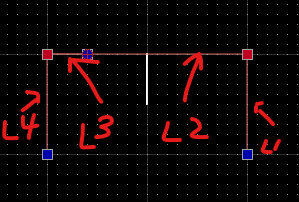
I have a line without any end points touching other end points. (The white line in the middle)
I want to select lines that only connect on both ends, to other end/start points.
So, in the case of this image… Nothing would get selected, because I do not have a closed loop.
Why do I want this? Well when using my water-jet, sometimes I import SVG, and there are lots of duplicate lines, single points, and other artifacts that take me a while to clean up.
If I could select shapes that are complete loops, end to end, and drag them out, I would leave behind the mess in many cases, and greatly speed up my work.
I’ve already been working on a script to do this, but the queryIntersectedEntitiesXY seems to have some tolerances built in, seems to grab things that don’t share a point with what I’m doing.
Is there some other way to select all entities that have a start/end point with a specific point.
I could just grab ALLL entities and brute force loop it. I was hoping there was some modifier on the contour select, that ensured it only selected segments in a closed loop.
It appears I can only select a closed path if it is already a poly line.
I’ve exploded all the shapes to find these tails, duplicates, zero length items, partial overlaps, etc.
You end up with hundreds of random “noise” in the drawing that you can’t really see no matter how far you zoom in.
So you need tools/options to find them.
I did… That is why there is an image attachment with labels on the line segments.
However I’ll draw a super simple example and attach that as well.
I have 5 line segments.
I want to select the 4 line segments where both the start/end point are at the same coordinates as another segment.
So click 1 button, select all lines head to tail, and then the next segment head to tail, and only segments, in the graph that have a neighbor on both head and tail, until I get back to my starting segment.
If I can’t get all the way back to my starting segment… Fail, no selection, tell me where the last piece was in the chain, or select the last piece or something.
So line 5 should not be selected in this example, but the other 4 should be if I start with any segment except 5.
If I start with line 5, NO selection at all, because it doesn’t form a loop. Simple Drawing.dxf (103 KB)
Hi,
There is no uniform answer on how to clean up a drawing.
This issue pops up every now and then.
There is no AutoCad ‘Overkill’ command under QCAD.
It may even be a bit too aggressive.
This queries entities that intersect with an RBox and not only those that end in the box.
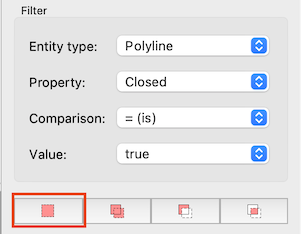
The double click to select ‘contours’ (All connected entities), TC, OG or OC methods look at the endpoints of entities.
But decision making gets more complicated when 3 or more entities end in the same spot.
You might want to Detect Zero Length Entities (MZ) first.
Then Detect Duplicates (MD).
Both methods have some parameters. MD will not easily detect partially overlapping.
I usually don’t delete them at once but will first send them to a ‘trash’ layer.
Polyline from Segments (OG) may chain elements as desired.
OC does the same but the starting segments are arbitrary.
OG creates geometrically closed forms, OC creates logical closed forms.
In both cases there might still be artifacts like going partially back and forth.
It may have a different outcome starting at a different segment.
In your first image (not a drawing ) select any of the 4 line segments.
In your second example (a dxf drawing) select 1,2 or 4 but not 3 or 5.
Where all methods stop chaining into an open shape, there might be partially duplicates/overlapping.
These can be selected individually with Alt-select.
And no, there is no one-click solution for any problem.
I was just checking the forum, I’m away of my home computer… but just giving a double click on an entity doesn’t select the connected entities? I have discovered this by accident some time ago, but can’t remember if it only works with closed loops.

 ) select any of the 4 line segments.