I am evaluating QCAD professional. QCAD version number is QCAD Professional Trial 3.32.5.0 (3.32.5), build date: Dec 18 2025, revised version: ad10f93, Qt version: 5.13.2, architecture: x86_64, compiler: SVC++14.0 (2015). When opening the drawing, there are abnormal display of annotation positions, annotation lines, and incorrect display of Chinese characters.
Is there a solution? Thank you!
Hi, and welcome to the QCAD forum.
Please attach an example drawing so we can help you more efficiently.
Or at least a snippet including the issues you have and explain further, document what you expect.
On Fonts we can be brief.
The font data itself is not stored in a DXF/DWG.
The intended font must be installed on your system in the case of TTF, OTF or related.
Otherwise QCAD will virtually replace the font and fall back on a ‘best suited’.
Best suited, best match can already be a problem when it is not in native English. 
It can also be the system standard font, that may be for example Arial on a Windows system.
QCAD does not includes/supports the proprietary SHX shape file format and falls back on a replacement CXF file.
In all cases, the used (replacement) font must include Glyph data for all required characters.
‘Annotative’ is not supported to my knowledge, you probably mean Dimension entities.
Basic dimensioning is supported and the reference points for that are known because these are all stored in a DXF/DWG.
It sounds a bit weird that QCAD would not take the measurements at the intended positions.
Or not place the measurement value where that belongs.
Basically 2D, QCAD can handle 3D information up to a certain point.
Reference points can be in 3D and then it will measure things up in 3D.
QCAD does not use cached dimension blocks and always renders dimensions from their reference points.
Not every specialty used by any other known or unknown application is or can be supported.
For some things, depending on the type, QCAD has it own ways of doing it.
In any case, it will be according the DXF standard as far as it is supported.
Regards,
CVH
Thank you for your support.
The attached file “8.2.07.0000326_J.4.dwg” is a DWG file.
The attached file “autocat2026.png” is a screenshot of the file opened in AutoCAD 2026, with Chinese text and annotation lines displayed normally.
The attached file “qcad_3.32.5.png” is a screenshot of the file opened in QCAD.
Please kindly review them. Thank you.
8.2.07.0000326_J.4.dwg (499 KB)
Hi,
Dimensions are indeed looking quite messy … The QCAD way 
There would be no solution except when using the command line switch.
And then only to export or print a file “as is”.
See full details in previous included link.
Without attachments to compare with …
Substitute Fonts (FF) reports 3 used font:
- ‘Arial’
- ‘txt’ (lower case)
- ‘SimSun’
Dimensions use the font ‘Standard’.
Already odd that FF doesn’t include this in the list … 
I can not really locate text based entities using the font ‘Arial’. 
The font ‘txt’ (suffix SHX or CXF) doesn’t really exists and is virtually replaced by ‘Standard’.
But in my case I have the font Txt.ttf (proper case) installed on my system.
That would mean that I can’t verify how that is rendered without.
I have the font ‘simsun’ (lower case) included in my QCAD font folder from previous inquiries by Chinese users.
And also variants of ‘SimSun’ (camel case) on my system.
The text that uses inline formatting in this font is then rendered as:
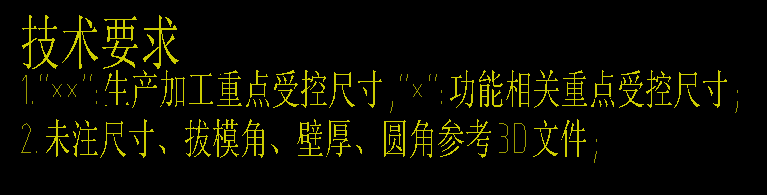
Its main font is ‘Standard’ (unlisted by FF), Rich text font is ‘Txt’, uses ‘SimSun’ and ‘txt’ for inline formatting. (case as listed)
I can’t tell which of the Sim-Sun font files is used by QCAD, suspecting that all is handled as names in upper case.
But obviously I am not at all able to verify if the above is rendered correctly.
I can only add that under QCAD there is no guarantee on the overall length of a rendered line of text.
And that the font height is based on the height of a capital ‘A’ in the used font.
Regards,
CVH