Dimension number position and leader line

Hi,
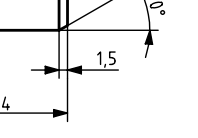
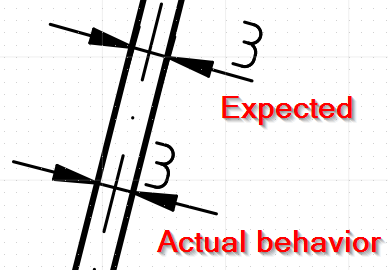
is it possible to setup QCAD to position the dimension number not over the arrow but rather over the leader line?

Like this:


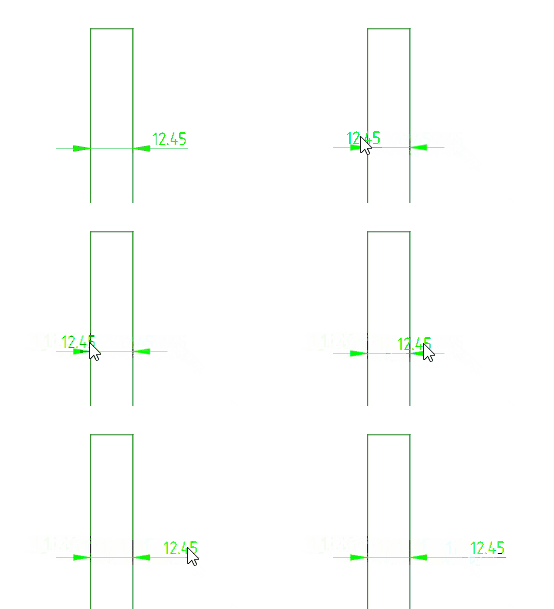
On a slightly different topic and i suppose this would be more of a feature request: Is is possible to have the dimension number switch sides automatically while the dimension is being placed? I think the current behavior is the dimension is fixed to the right side. (demonstration from another cad sw):
dim_sides.gif
Thanks for any input!

Not that I know, but you can edit a dimension and drag the text to wherever you want.

Yes, that depends on what point you click first.
When it fits in between, then centered is dominant.

I was also used to the 4 step process: first/second extension, dimension line and then the text position. :wink:

What you show in the demonstration can be achieved with editing a dimension.
The outside ‘leader’ length itself is fixed =arrow size.

Regards,
CVH

Thanks for the answers.

Isn’t the current way invalid though? From the standardization perspective, i think it is. I just checked with ISO 129-1 and it says:

5.6.3 a) dimensional values can be above the extension of the dimension line beyond one of the terminators, if
space is limited (see Figure 25);

Thanks, this makes sense, i didn’t realize.

So when we need the dimension number be displayed in the outside, we also need to add the extension line manually to have it reach the end of the dimension number in case it is longer than the dimension arrow. This feels very lengthy.. Maybe i should try proposing this to be implemented in the relevant forum section?
Dxf supports auto lengthening the ‘Leader’ side.
One can always file a feature request at:

You may need to create an account there.

Regards,
CVH