Hello, first off I’ve been using QCAD for a few years and love the software. Thanks to the wealth of information here and elsewhere I’ve been able to find answers to nearly every question I’ve had. However, I’m stuck now. Maybe it’s something simple
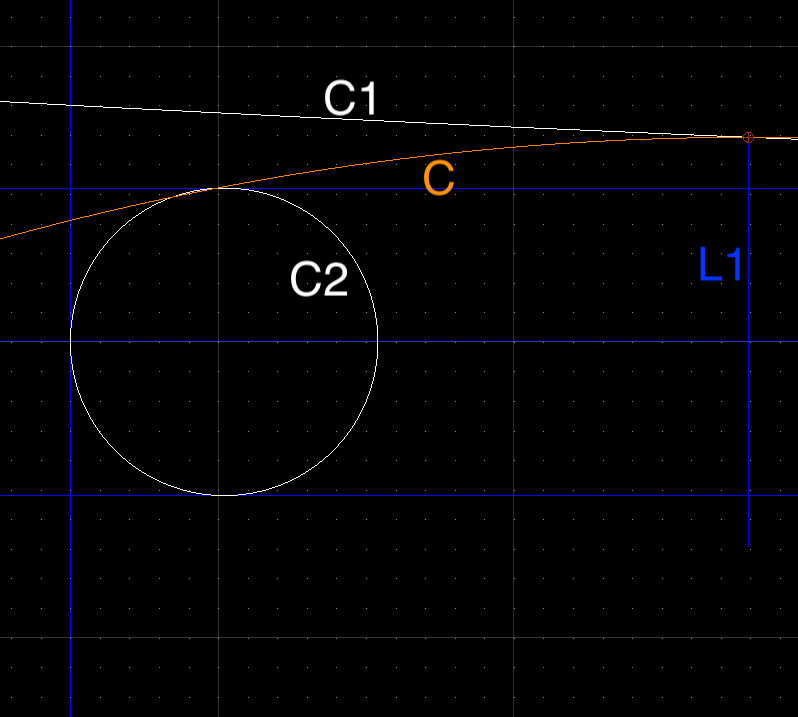
I’m trying to place a circle that is tangent to two other circles and has a single point. I use “2 Tangents and Point” (CT2) command often, usually with success. I believe what I’m trying to do is “valid” but no solution presents. I’ve attached screenshots for reference.
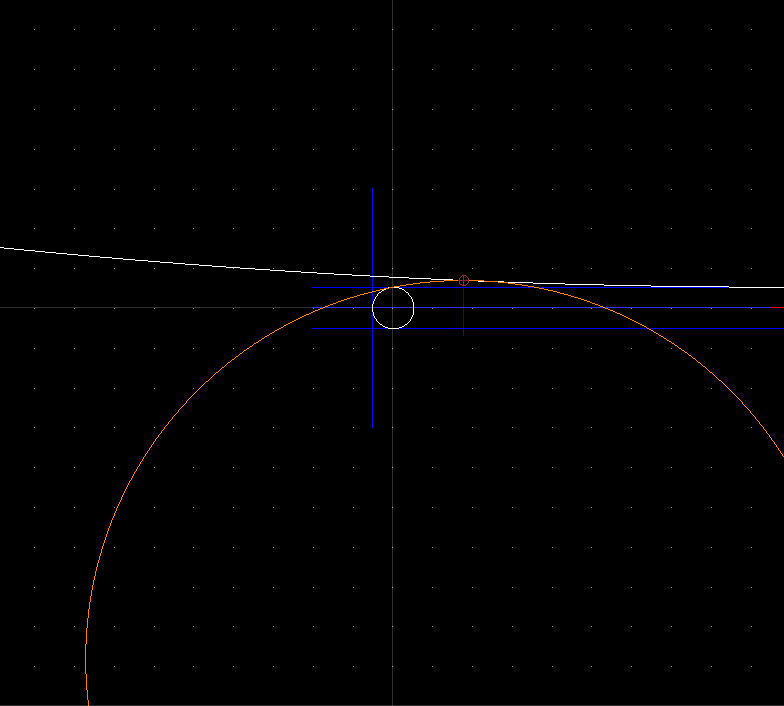
I’d like the new circle “C” to be as follows:
Tangent to both large and small circles
Point at the end of blue line “L1”
Placed OUTSIDE of large circle “C1”
SURROUND the small circle “C2”
**BLUE lines are guidelines
**WHITE lines are reference geometry for new circle placement
**ORANGE lines are approximated geometry I’m trying to create
Thanks for any help in advance and apologies if this has been answered elsewhere. I’ve read a few posts relating to tangent placements and don’t think they apply to my situation.
In the screenshots I’ve placed an ORANGE circle approximately where I’m struggling to create a circle that meets the above criteria.
If the tangent point equals the given point then a single result is returned.
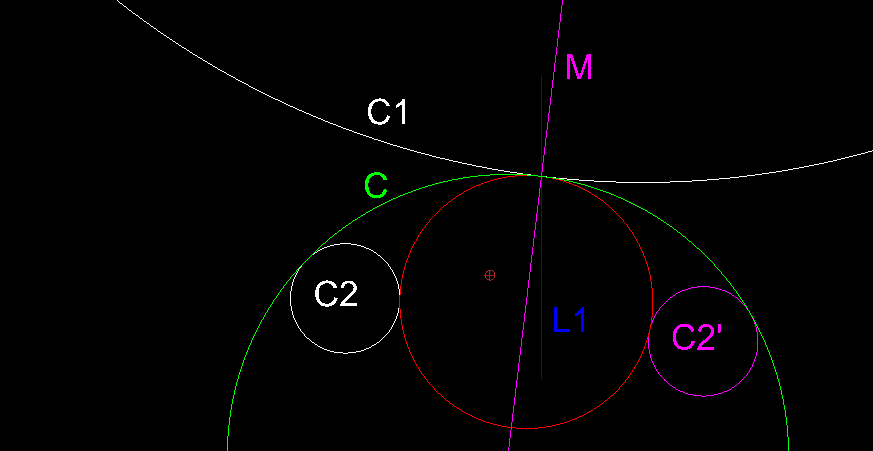
This red circle is externally tangent to both C1 and C2.
The chosen side of C2 should make a difference but it is not.
Not really a bug, rather a limitation.
Mirror a copy of C2 according an axis through the center of C1 and its intersection with L1.
Not required but for clarity I added the mirroring axis M.
Use CT3, indicating C2, C1 and C2’ and select the intended circle C from the (<=8) possible results.
Remark that M goes through the centers of C1, C and the center of the red circle.
If any, a mutual tangent point lies on the line connecting the two circle centers.
Thanks for the welcoming and quick and helpful reply. I logged back on realizing I had forgotten to post my test file and was surprised to see a solution already!
I was able to recreate the intended geometry using your method, and that’s great. I can’t help but wonder why all possible solutions aren’t shown for CT2 the same as CT3? Wouldn’t it be reasonable to expect that a choice of all possible solutions is desirable?
Also, I notice some ARC tools have a Clockwise / Counter-clockwise option for solutions.
The workaround you provided will help me and I’ll mark this post as [SOLVED] but just want to make sure if this is something that should exist whether a bug or feature request should be filed?
Thanks again for your quick help, now back to finishing my drawing(s)
At the moment I am processing the underlying code.
Perhaps I can come up with a dual solution for CT2 when the point is on one of the circles.
Already exclude for when it is on both circles but that is a no brainer …
… The resulting radius would be zero and casting zero-length entities to the drawing should be avoided.
The circle tools may return many solutions, limited to 8, but if the math returns a single solution then the user is not presented a choice.
It is thus simply the matter of including more possible results, the rest would be handled by default.
Most probably fixable … When I can construct it then it should be feasible.
It basically boils down to inadequate handling of inversions through a circle of inversion.
And missing or faulty FS2589 tangent lines for two given shapes …
… Not limited to circle shapes.
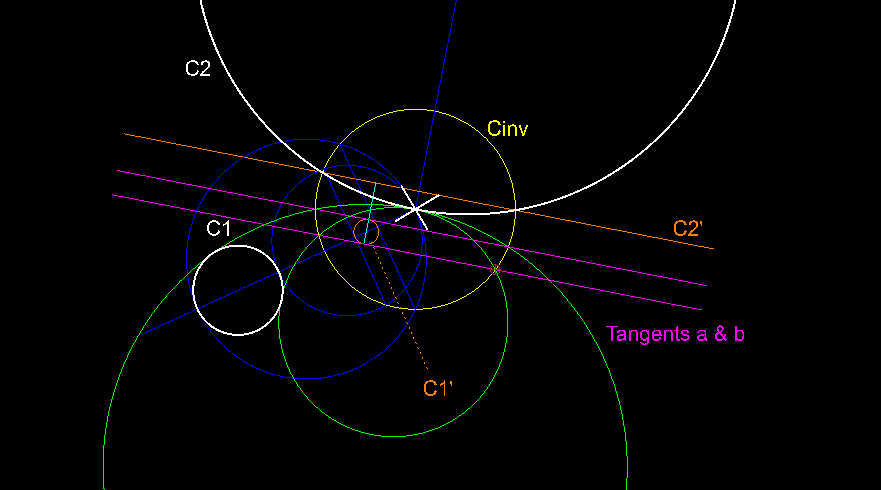
Given (white): C1, C2 and a point on circle C2 (cross)
First CT2 uses a specialized piece of code to return at least something.
Or to not include certain possible solutions.
But it should simply rely on basic inverse geometry … e_geek
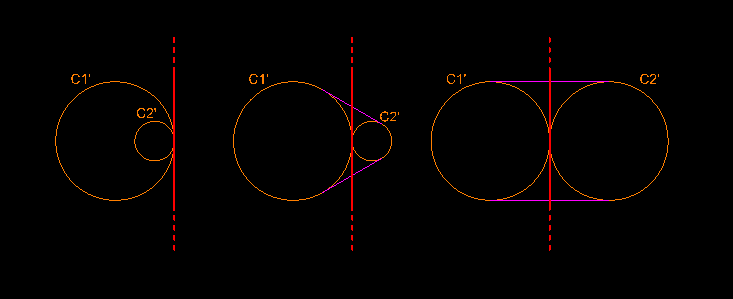
First construct an arbitrary circle of inversion Cinv (yellow) at the indicated point
… The radius is not critical but there is good and less good what will be reflected in the accuracy.
Then construct both inverse shapes C1’ and C2’ (orange)
… Because the center of inversion is on C2 the inverse shape C2’ is not a circle e_surprised … C2’ is an endless line … R = infinite
Next, construct all tangent lines between both inverse shapes (magenta)
… One inverse shape is a line and that fails completely but consider tangent a & b as being tangent to C1’ and in special to C2’ at infinity
The possible solutions (green) are the inversions of all tangent (a & b) regarding the same circle of inversion Cinv
… Here one can also construct both 3-point circles with 2 points where the tangents cross Cinv and the center of CInv as third point
As easy as pie.
Meaning that only by using basic inverse geometry all possible solutions (<=4) of this special case of the Apollonius’ problem can be found.
Type 7: Special cases of Apollonius' problem - Wikipedia
Unless it is a case with no solutions …
What is not returned can not be used to construct a re-inversion.
Try CT2 on nested circles, not concentric, not touching, indicated the larger first …
… There are 4 solutions for a point inside the annulus, not just 2.
Other tangent shapes that are typically missing are marked in red:
Something that is also detected:
See CT2 on nested circles but now indicate the smaller first.
The order of how shapes are passed to the common tangents function may already influence the returned tangent shapes.
It should not … And the order of what is returned should’t matter, the re-inversion of all valid tangents are perfectly valid solutions.
The inverse of bogus tangent shapes will of course be bogus solutions and those need to be verified and cleaned out.
Other GUI tangent circle methods can suffer from the same shortcomings.
There are fixes to fix things that should not be left out to begin with.
Should be resolved if and when Andrew adopts the provided code enhancements:
The updated/enhanced code will present all solutions in all conceivable situations for Circle2TP.js.
For me, using the updated Apollonius.js script, the case is closed.
I’ve seen this listed in other parts of the forum, and wish I were able to figure this out from that information. Specifically this post has good information on implementing scripts but I’m not having any success. Tangent arc - QCAD Suggestions and Feedback - QCAD Forum
So far I have visited your FS#2592 and downloaded the .js file and tried to make use of it (unsuccessfully) like in the above post…
Could you please help me once more in trying to sort this? Then I shall know how to help myself
As far as I know I did not post a fully revised Apollonius.js script … Yet.
In FS#2592 I provide newer code for 2 functions that are part of the Apollonius.js script.
Anyone willing can adopt/merge these code pieces into a copy of the standard included script file.
The standard script can be retrieved from GitHub here: Apollonius.js
With a text editor one can overwrite the code of Apollonius.getSolutionsPCC with the one provided.
This exploits an enhanced algorithm for finding all tangent shapes between 2 shapes …
… Not limited to two given circles shapes
With inversions we enter the realm of infinity and then points or lines are also circles.
A point is an infinite small circle and an endless line is an infinite large circle.
Additionally even parallel line shapes are considered to be tangent at infinity.
With a text editor one can add the provided code of Apollonius.getAllTangents.
Where is not really important as long as it is after/below the creation of the base class (Line 26-27).
I included the Apollonius.getAllTangents function just after the incomplete version called Apollonius.getCommonTangents.
The revised Apollonius.js script must then be included under the folder …/QCAD/scripts
Where the 3 dots are the installation path of QCAD or the local data location (See: Changelog 3.26.2), QCAD or QCADCAM or …
On a Win system one probably needs Admin rights to address the content of the Program Files folder.
It may be required to manually add the required folder structure.
The full path should then read …/QCAD/scripts/Apollonius.js
On a QCAD restart our copy of the Apollonius.js script supersedes the standard version usually only present in compiled form.
But I am beyond that.
With the enhanced algorithm for tangents one can solve more special cases of the Apollonius’s problem
returning ALL conceivable solutions (0-6 or 8 candidates) in a few lines of code.
I am still refining several of such code blocks.
Before releasing I need to test each conceivable problem setup and verify its usually enhanced accuracy.
With floating point things can’t be exact and ‘near’ tangency can be a mathematical problem area.
As on the ArcTangential.js
That should still be valid and functional when the instructions are followed to the letter.
May I ask to contact me per Private Message (PM) on that matter.
The easiest way is to click on my forum user name and take it from there.
Include a screen capture with the content of your …/scripts/Draw/Arc/ArcTangential folder.
Tutorial: Script Programming is a start.
The learning curve can be steep to start with.
The QCAD API is quite vast and it takes some time to get a complete overview.
But let us discuss that off-forum, send me the questions per PM.
User verticalwhiteout reported that CT2 is now fully functional once he implemented the changes correctly.
He first had overwritten Apollonius.getSolutionsPPC instead of Apollonius.getSolutionsPCC.
Crippling CT1 in the process.
I can also report that Andrew adopted the changes to the Apollonius.js script for the upcomming snapshot and newer releases.
When updating QCAD it would be of interest to remove the revised custom copy under the folder …/QCAD/scripts
In the mean time I am looking into the advantages of using Apollonius.getAllTangents for solving other special cases of the Apollonius’s problem.




 … R = infinite