I’m preparing files for printing some full-sized plans for my kayaks. One option I’m working on is to supply a pdf for use on a continuous roll printer 840mm wide. One issue is that several solid black circles, 22mm in diameter, appear on the paper print-out at the intersections of a straight line and a spline, where the intersection is almost at 90 degrees. When I zoom right in on the parent .dwg file I see a perfect clean junction, with no circle.
I’ve spoken to the commercial print shop, and the technical staff could offer no explanation.
On another issue, can one enable borderless PDF printing within QCAD?
With thanks in advance, Nick.
is this a QCAD drawing? However - would it be possible for you to post this drawing or at least an example drawing what shows the same problem? If your drawing is confidential you can use my PM and it will stay confidential!
Husky, thanks for your prompt reply. Yes, this is the paper print-out of the pdf saved from the QCAD .dwg file. Do you want the .dwg, the pdf, or both?
The design is not yet released to the world, so does the PM system allow attachments?
Nick
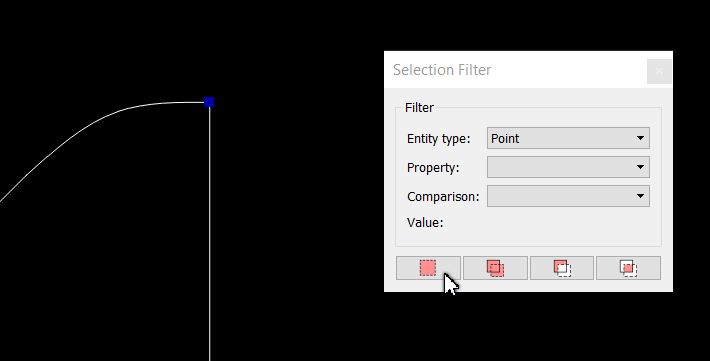
The problem is caused by “Points” in that particular drawing. To get rid of them use the “Selection Filter” in QCAD (you’re working with the QCAD Pro Version?)
Launch the selection Filter, (Menu/View/Selection Filter),
tell the Selection Filter what you are looking for …
Husky, each time I now export to PDF all I get is a two blank page PDF. I’ve zoomed right out. I’ve tried it three times: File> Export as PFD > Save as (PFD)
There were just the four blue blobs on the four positions of the black discs. I deleted those, and the .dwg appears complete.
Nick.
Husky, when I now export this file to PDF the result is a blank representation of the white paper at the correct size, but no graphics. This occurred after removing “points” via Selection Filter. I am able to export other files to PDF from QCad.
To attempt to fix this I have re-installed Adobe Acrobat and QCad Pro v3 15 5 and ensured that in Graphics view> appearance that the box is checked for “prevent white on white/black on black”
I will PM you the full size .dwg file and the 25% scale .dwg which is the one I need to send to the commercial printer.
I’ve run out of ideas, so I’d be most grateful for your help.
Nick
I think the problem is based in the pdf reader and not in QCAD. I tested your (via PM) pdf in two different reader - on the screenshot on the left I used the adobe reader:
Screen Shot deleted by Husky/ Moderator
If you have a different reader please check it by yourself.
The commercial print company I use asks for the documents in Adobe PDF, so I’m stuck at present. I’ll look into alternative readers, and try to understand how to use them in QCad. I had reinstalled Adobe reader this morning in order to rule out that as a source of error.
Thanks for the reply
Nick
Question: Do they (you?) really need a “one page” pdf which is 841x6600 mm? Would not also work a two side pdf? Adobe is able to read the drawing divided in two. Or put the parts on a 1800x3500 sheet …
I’m curious to know why you need this printout in this size? A Printout which is 6600 mm in lengths …
The commercial printer bed is 841 mm wide and I’ve already received a paper print from the company at 841 x 6600, and that is perfect for my purpose. That was printed from QCad Pro last week using “export to PDF” on the 25% scale .dwg, so something has changed since then. I’ve just used Zamzar.com to convert the .dwg to PDF, and that fails in the same way - just the blank white page.
Nick.
Yes, I’ll PM it to you, and it opens correctly. It’s bed-time now in the UK, so many thanks for your continuing help, and I’ll look back tomorrow.
Nick
Ok, it looks like Adobe Acrobat Reader has a Page Size Limit of 200" by 200". I tested it in mm for your drawing: 5080 mm works - 5081 will be presented as a blank pdf sheet in Adobe! Other Reader are able to read much bigger pages …