From a QCAD user:
How can I create a regular 2D array of an object in QCAD?
From a QCAD user:
How can I create a regular 2D array of an object in QCAD?
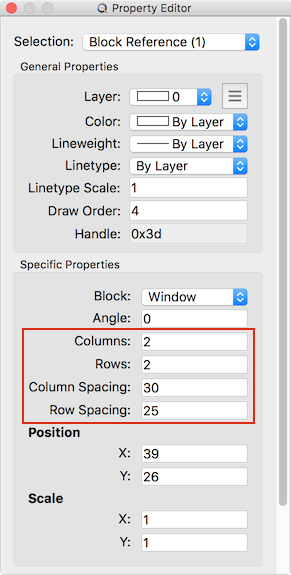
While you can of course simply copy an object several times using an equal distance, the most convenient way is to use a block array:
Creating a Block from Your Object
If I create an array from a block, it behaves like a block itself: I cannot break the array without the initial block being exploded also. I thought it would be possible to break the array to keep the individual blocks generated ??
J-J: That would make a lot of sense, yes. You can patch your version to explode block arrays into individual block references:
https://raw.githubusercontent.com/qcad/qcad/65a2a9a811fc200f02d9da823fe657f505249461/scripts/Modify/Explode/Explode.js
This file replaces file scripts/Modify/Explode/Explode.js of your QCAD installation. This should be considered experimental. Please back up the original Explode.js in case there are any problems.
Hi Andrew,
I replaced the script and on the same test, that seems to work OK 
Thanks
Excellent, thanks for the feedback. This will very likely be the new behavior of the explode tool for the next release.