It would be a nice feature if one could adjust the thickness of the architectural tick.
The thickness of an architectural tick is controlled by the layer Lineweight Attribute. Increase the lineweight value and it will increase the thickness of the architectural tick. 
Hi Husky, won’t changing the layer lineweight value affect the thickness of all dimension lines, not just the architectural tick ?
True, except the text font if that is also line-art like the CXF font ‘Standard’ with screen-based.
Probably the main idea is that if the tick is too narrow then the other dimension lines are that too. 
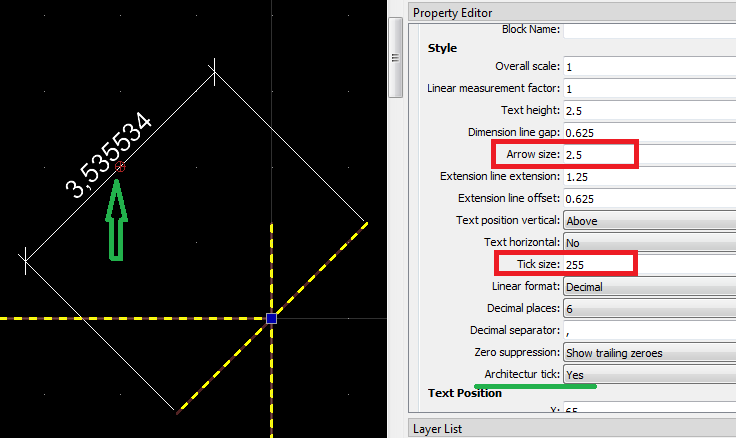
If it is the width of the tick size then the user should set a larger global arrow size or a style override of the arrow size.
Strange enough setting the style override tick size doesn’t alter the dimension in question.
Remark that the actual tick length is sqrt(2) times the arrow size or about 41% larger.
Regards,
CVH
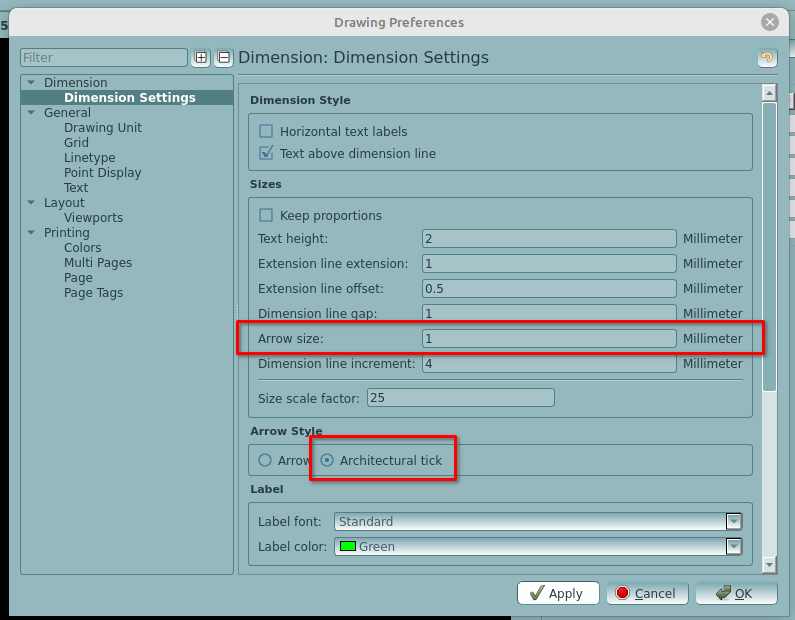
The style setting for arrow size (Drawing Preferences>Dimension>Dimension Settings>Sizes>Arrow size) does not affect the tick width, it affects the tick length, by default in my system it’s set to 2.
This is all based on textual misinterpretations.
The user ask for a line thickness … Line weight.
The preferences are ‘size’, not meaning weight, not meaning length.
I used ‘width of the tick size’ to avoid ‘length’.
If we can agree that the length is in the direction of the dimension length then the width is measured orthogonal to that.
Inline with the dimension length could then be called ‘length’ but along the tick line is also its ‘length’.
The actual tick length is sqrt(2) times the arrow size.
Simply because the tick is the diagonal of a square with sides that have the same length as the arrow size … What is the arrow length.
And there are two options to set that size:
Global by Drawing References and individual by style overrides.
The second will supersede the first, still, for specific ‘sizes’ it is just the same.
Regards,
CVH