Script to read block name, copy name and enter as text

Hello QCAD users,

I need a script that will read the block name for the selected block and copy it to the clipboard (Referenced block name).
In the second step, this block name should be entered as simple text at the desired location in the drawing.
I have over 250 blocks whose names I need to write on the drawing.

Since I’m not a programmer, I tried to use artificial intelligence, but unfortunately, unsuccessfully :confused:

Anybody can help me with that?
Thanks in advance
_
Rolinger

Versions
QCAD Professional version: 3.32.2.0, Linux Mint

Hi,

Blocks are listed in the Block List and have no specific place in your model.
A Block is a collection of entities. Model_Space is itself a Block.

We tend to use the term ‘Block’ for two rather different things: A Block definition and/or a Block Reference.

Block References are drawing entities and have a certain position in the model.
They display a copy of the referenced Block content at the insertion point.

Thus … 250 Block References or 250 Blocks in the Block List ?


BlockRefExport.js in the Misc section already exports the occurrence of Block References to CSV.
As: ‘Referenced Block name’, X, Y
Menu Misc .. Block .. Export Block References List…

That is already a good overview of all Block Reference entities in your drawing.


Lets try to use QCAD methods to accomplish this.
Selection filter: Type: ‘Block Reference’ ; Property: ‘Referenced Block’ ; Comparison: ‘is’ ; Value: Enter Block name
Left action button: ‘Replace the current selection’

This are Block References and these only have an insertion point beside some other properties.

Misc .. Information .. Store Positions (TT).
Draw .. Text (TE) and replace former text by the Block name .. OK
Misc .. Information .. Use Positions (TY).

The text will be created at every Block Reference insertion point that was selected.
But this is not really usable for 250 Block definitions in the Block List by name.


Yet another possible way … Include the Block name as text in the Block definition.
By this you could ensure that the text is displayed at a well readable place for each Block.
Otherwise the ‘desired location’ is always related to the insertion point, no matter what the Block content is.


Otherwise define ‘desired location’ and provide a test file, explain what is required within that example file.
Define ‘selected’: Selected in Block List or selected Block Reference entities.
Give some examples, for example on a dedicated layer that can be hidden.

Regards,
CVH

First of all, thank you for your answer CVH.

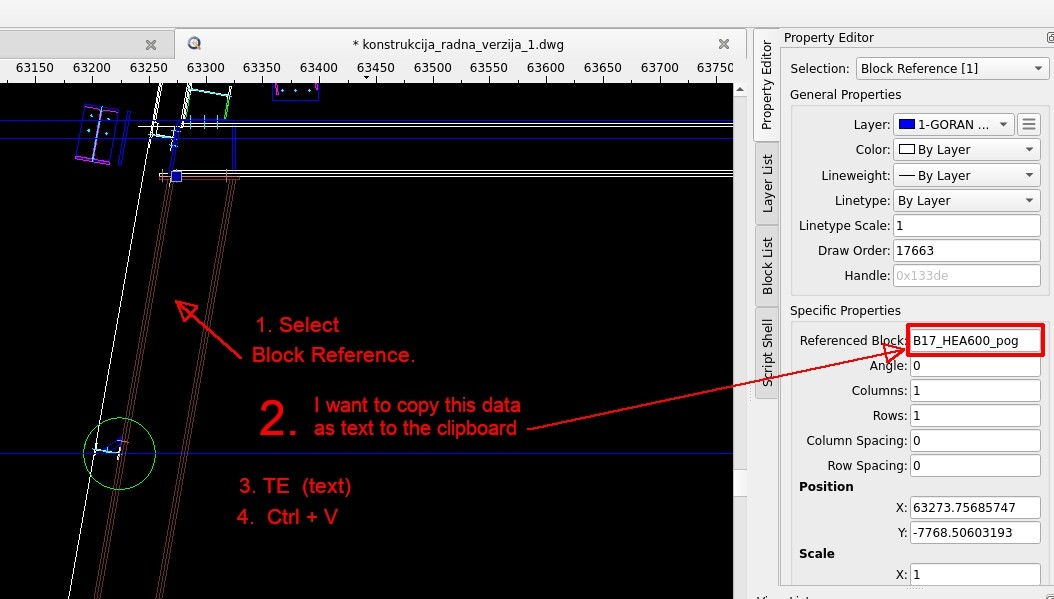
I’ll try to describe what I want in the following image:


For me, success would be if I could select a block reference in the drawing and run a script with a shortcut that will copy the referenced block name. That would be more than 50% of the job. Now I wonder if that’s even possible?

Thus … 250 Block References or 250 Blocks in the Block List ?

I guess 3*250 Block References for 250 Blocks in the Block List. I have nothing but praise for QCAD’s performance. I use this drawing with 250 blocks and a bunch of graphical elements on a 10-year-old laptop with 8GB of RAM and an i7 processor. I keep the entire drawing “clean” without unnecessary and redundant hatches for now. I use Edit block in place (BB) to edit block references, and I am extremely satisfied. The time “lag” needed to refresh the drawing is 2-3 seconds!

Best regards, Rolinger

With scripting almost anything is possible, your imagination and scripting skills are the limit.
Remark that most QCAD tools are scripts.

Not as you described in the 1-4 sequence, we are not going to copy the block name to the OS clipboard.
The QCAD clipboard is intended for copying geometry and the Specific Property is not yet a Text entity.

You can run a custom script with XC and indicating a script file from a file list.
With a shortcut’ … Then it must be conceived as an Addon tool … Remark that there are not many shortcut combinations left over.
Also, as Addon it has an action button … For example listed under Misc .. Block
Already happy that your QCAD GUI is in English.

For a single Block Reference that could be conceived as:

  • Select 1 Block Reference entity
  • Initiate custom Addon tool
  • Place text entity (With preview).

But that would still require 3x250 independent actions.

Automated can be as:

  • Selection filtered for Block Reference entities
  • Initiate custom Addon tool
  • Place a text entity for each.

Or by selecting the Block name in the Block List and then for all Block Reference entities that refer to that Block.
Or for all Block Reference entities that exists in the drawing at once.

As said, almost anything is possible but you need to decide on a plan of attack.

For ‘automated’ you need to specify the relative placement of the Text in regards with the Block_Ref. insertion point.
Otherwise it is simply put at the Block_Ref. insertion point … (The blue squared marker in your screen capture)
Automated there is no user interaction for arranging that individually.
But even that is possible … Again 3x250 manual interactions for a single run … You will get bored by indicating all these.
(Similar to ‘Reorder’ MO until they are all green)

Also: How this text is aligned, 3x4 options, from left high to right low.
Angled? Consider Block_Ref. angle?
Considering Block content? In the Middle? Or right low?
What font, font size and color?
A dedicated layer or not?
Selected in Block List … Only for Model_space or process stacked Blocks?

..

In other words … Before we can code something, we need to know the requirements.

Regards,
CVH

To make a plan of attack, I first need to describe the way the drawing is created and what I want to achieve.
EXMPL.dwg (55.5 KB)
So let me explain:
Each block represents a part consisting of a steel profile, steel plates, holes, bolts, etc…
Each part can be represented in a 2D drawing in at least one or more views - plan, side plan, section, etc…
Each part (each block) has a unique name with a suffix added that indicates the view used (plan, section,…). The first part of the name is unique for each part. The second part of the name in the suffix is ​​somehow standardized and describes the view used (plan, section, side plan…).

Each block has its own position in the GAD drawing.
What do I want to achieve with the script?
I want to display the name of each part. Nothing more and nothing less than this. For this, I planned to create one layer, e.g. Part_name_layer.
The text font, text size and alignment can remain current, i.e. as they were last used when entering the text.
Once we have the block names in a common layer, it is easy to manipulate the suffix used in the name - change it, keep it or delete it.
I can also change fonts, text size etc…

The next step is to use the excellent QCAD script T2L, which I will use to link the block name to the desired block reference. (QCAD.org Forum - Information)

I don’t have any text entries in the draft yet.

Considering Block content? In the Middle? Or right low?
What font, font size and color?
A dedicated layer or not?

Your suggestion of automatically entering block names at the Block_Ref. insertion point or even better considering the content of the block in the middle might not be so bad (I didn’t know this was even possible. :wink: )

Each block will be used further to create a detailed workshop draft. It will show dimensions, details, descriptions, etc…
I haven’t figured out the fastest way to do this yet - manually copying each block into individual new drawings or something else…I need to think about the best way to do this with QCAD. I’m still a beginner in the QCAD world though :slight_smile:
In any case, thank you VERY much for your time and advice!

… Thinking out loud:

Automated was discussed because of the vast amount (~3x 250).
Automated, the text position is kinda a fixed offset in regards with some reference within the Block Reference.
Considering the displayed Block content or not.
(Please diversify between a ‘Block’ OR a ‘Block Reference’ in your posts)

Fully automated for all Block References in the current active Block (e.g. Model_Space) creates duplicates on a second run.

Automated for all selected Block References may create duplicates depending the selection.
At least there is the option to not process all Block References.

If the idea is to process each included Block name Text entity afterwards with T2L … Again ~3x 250 items …
Would it not be more appropriate to combine all that as a tool that includes a Text entity and a Leader:

    1. Indicate a Block Reference
  • Presented preview is the Text floating in association with a default Leader.
    1. Indicate Text position
  • Presented preview is the Text no longer floating with the arrow tip floating
    1. Indicate Leader arrow tip position
  • Over new until the tool is terminated.
    (A WIpeOut under the text would be nice :slight_smile: but this entity type is undocumented :frowning: )
    As interactive we can step one level back from state 2 or 3.

Such a tool would be usable along in the design process (only) where required and has perhaps some purpose for more users.
True, for existent drawings with many Block References it would take some effort to include them all.
At least only for the intended Block References at a proper place with a proper Leader.
If there are a few missing or when Block References are added, the Block name Text + Leader can be added in just the same way.

Regards,
CVH

Please see later today for an initial attempt. :wink:
Send to you as Private Message.
See forum top right for that.

Regards,
CVH

Piggybacked that on the current attempt.
It runs once in that mode if you force a hidden preference.
Just to prevent it from running multiple times by accident or unintended.

But it is a bit messy because the text and the leader are at a fixed offset to the Block Reference insertion point.
Most entities in QCAD are unrelated, there is also no simple AI method for a proper arrangement without masking others.

It creates those in an instant for every (selected) Block Reference.
Just the same for 1500 Block References mentioned per PM … Adding 3000 entities … :wink:

Nudge me to receive a preliminary copy. :wink:


I said ‘unrelated’ but that is partially not fully true.
Why should I not use things that are proven to be beneficial?
New entities receive a ‘Selection Group’ tag and you can select things together with: Entities Selection Groups
Activated the selection listener, move them as one (MV, by dragging or use the arrow keys), drag the arrow tip by its marker.

Regards,
CVH

Now including a Wipeout with the same ease … :wink:

See Q&A about the recently added RWipeoutEntity

Regards,
CVH

Another option to consider would be to just add the text to each individual block instead of writing a custom script for it. If the purpose of this script is to add the text when you want to instead of to everything, you could always make two separate blocks (one with the text and one without the text) and use the appropriate one for the appropriate situation.

For a script like this, I could see a future issue being the positioning/rotation of the text. A simple version of this script would end up adding the text to the same point for every single separate block. After the script is made, you’ll probably end up wanting it to insert the text at a specific place that is based on the geometry of each individual block. This will require creating and maintaining a database within your script of all possible blocks and the coordinates of the insertion point and rotation for each individual text entity.

Just a thought.

I my initial reply:

The issue is probably that this are not individual entities or 1 text block per Block Reference.
The next step was to add Leaders with T2L.
An additional Wipeout would be nice too.

Another issue is that we can’t define a text to always have a ‘readable’ angle.
The Block content can be displayed at any angle.


Not really, most entities are fully unrelated under QCAD.
There is thus no intention to create the Block name text near a Block Reference and make it parametric.

I don’t need a database …
On creation near a Block Reference I can query the Block (definition) content at that instant.
Content is then translated, rotated and scaled according the Block Reference properties.
Of this we can take the bounding box center, a corner or whatever.
All done in the background.

Afterwards the added entities are again fully unrelated to other drawing content.
What can be done is ensuring that the Text, the Leader and the Wipeout can be selected together with Entities Selection Groups


First: Please diversify between a Block (definition) and a Block Reference.
A Block Reference is itself an entity that lives on a layer and has an insertion point in the drawing.
A Block is a collection of entities … A Block is not a part of your drawing and has no position in for example the Model_Space Block.
Blocks are only listed in the Block List.

It is thus practically impossible to define a Block position reference in the drawing.
But each Block Reference is basically nothing more than a positional reference.

Your assumption is true when two Block References are inserted at the same position.
I don’t see duplicate Referenced Block names at the same position as an error of the tool.
Duplicates of Referenced Blocks at the same position is by design and at user discretion.


BTW: The script is already fully functional for:

  • Each indicated Block Reference in a 3 step process.
  • Automated for a selection.
  • Automated for all Block References in a drawing (Model_Space).
    (Automated only runs once it you force it to because this can lead to duplicates)

Regards,
CVH

Fair enough. I forgot by the time I got through reading it all.

This is an interesting idea that could help. I didn’t originally think of doing your text positioning/rotation/scaling based on the content of the block. However, whether you need to maintain a database or not would depend on the blocks (definitions) and what you’re trying to do. He said there were ~250 different blocks (definitions). I’ll admit I don’t know anything about the 250 blocks so maybe not maintaining a database would work, but it is also possible that the blocks have different requirements for where the text should be positioned/rotated/scaled. A script without a maintained database would place the text in the same exact way for all 250 blocks (definitions) which may or may not be sufficient. It would probably be ok to not worry about maintaining a database based on the example file since everything is relatively square, but what if some of those blocks have goofy shapes? For example, a script that places the text based on a square bounding box might put the text too far away if the bounding box has some emptiness on the side where the text gets placed. That’s all I was getting at.

By “Block”, I was referring to a block definition.

What I was getting at was that each block definition has its own origin point and its own gross geometry of the entities that make up the block definition. So when you’re inserting the text, the script would insert the text in the same position relative to the block reference entity for all blocks. So, say you have a block definition that the entities within it have a bounding box that is 10x10 and the origin is at the center of the 10x10 bounding box, you might have your script place the text at 5,6 plus the insertion point of the block reference entity. But then if you have a different block that has a bounding box that is 20x20, your 5,6 plus the insertion point would place the text overlapping the block reference entity rather than above it like with the previous example. If you then improved your script to look at the bounding box of the block definition and insert the text at a position that has a y value that is 1 more than the largest y value within the block definition, you might run into a problem if the entities within the block definition are arranged in an L shape since the text would be positioned near the empty section of the bounding box.

This reminds me that I was also going to request to leave this stuff public. I’d be interested to read through the code, even if it is something that I won’t ever use. Insights can be gained from looking at the code of other developers.

Meanwhile

Meanwhile

But there are issues when saved as DWG (FS#2651)

No automatic created database would fix the ‘void’ issue.
There are plenty of online examples of code to add labels in so said proper places …
… Typically exploiting a convex hull … But all will fail in some specific situations.

Automated may get messy but it adds a label to all (selected) Block References in one action.
It is piggy backed on the 3 step interactive script.
Simply to address the vast amount of Block References.

Proper placement can then be done individually or as group if required.
(There was already the intention to process each label with T2L)

Depending on the follow up I might release it in public.
But the follow up has more to do with XREF capabilities … :unamused:

Regards,
CVH

I never said anything about creating the database automatically. I agree it would be messy which is why you’d need to create/maintain a database to fix the mess. Well, maybe a smaller one that only contains the block definition names of the specific situations which fail. Something simple like this:

var blockNames = [];
blockNames.push("exampleBlock1");
blockNames.push("exampleBlock2");

var blockPositions = [];
blockPositions.push(new RVector(5, 6));
blockPositions.push(new RVector(2, 15));

Then, just include a simple check to see if the block name is in the blockNames database and, if it is, use the positioning information from the blockPositions database, and if not, run the main add labels in proper places script. Also note that when I say “database” I’m not referring to a big official database, just something small and simple to store the information within the larger labeling script.

Did you have this script made before the OP started the thread? If so, then nevermind my request to make it public. I read it like it was taken off the public portions of the forum and was worked on in private after the fact.

And how long thus this ‘database’ lives?
Variables have block scope.
The lists are created out of the blue or are they hard coded?
Where are they stored within the document for later reference?

‘Blocks in the sense of Block definitions’
… What if I use a Block Reference at a scale, at an angle?
Is that unique Block definitions label position still valid when turned upside down? When mirrored?

As said, automated is kept simple, one Block label (set) for each (selected) Block Reference.
Simply pointing to the insertion point of the Block Reference but that can be anything.
Simply at a fixed offset to the insertion point or other reference point.

The 3 step interactive mode lets you add the referenced Block name where you want it with the Leader pointing where you set it.
That is: ‘Script to read block name, copy name and enter as text’ + T2L in one action.


Regards,
CVH

Hard coded. And you don’t need to store them in the document for later reference because you can just reference the code. This kind of comes back to my last question to you which was unanswered. Is the OP trying to make a tool for him personally for his personal set of block definitions (all of which neither of us, presumably, has never seen?) or is the OP trying to make a tool for everyone? If the answer is for everyone then you should probably ignore the database comment (like you’re doing, because it seems like you’re defending your own tool, rather than assuming my comments are for the OP and him coding his own tool). If it is for him personally, including a small database seems like it would save a boatload of time over trying to make an automatic program that works for all of his blocks, assuming there are complex blocks that cause problems.

Well, you could just have a couple more variables: i.e., blockScale and blockAngle. Is it still valid when turned upside down or mirrored? I don’t know, I’m not the OP and I’m not you. If you’re coding this yourself and don’t want to do the database option, then don’t. If the OP is the one coding this and he isn’t the best coder, a simple database that keeps track of some information related to his personal list of blocks might be easier to code for him then some AI tool that can work for any block list from any user.

Maybe. Is the OP’s list of blocks simple enough for this to be the case? I don’t know because I haven’t seen his full list of blocks. Have you? You said yourself that “all will fail in some specific situations.” It can’t be both.

Yes. It can be anything. We don’t know. That’s why the OP might want a simple database. To override his main program if he needs to.

What interactive script mode? Did you program something yourself or are you helping the OP code something? Again, it feels like you’re defending the use of your own tool. It feels like you’re assuming my comments are critiques on your tool and what your tool needs. I’ve never seen your tool. I don’t know anything about it and can’t possibly comment on it or what it needs or doesn’t need. My intention with my comments was to provide value to the OP who might not be good enough at coding to do a 3 step interactive mode.

Oh, one more thing. I made one of these too. Only instead of it automatically inserting the block name it inserts whatever text the user types into a text box on the options bar. The first step is the arrow side of the leader, and the second step is where you want the text to be in relation to the leader head. How does that compare to yours? What’s your third step for?

It is not about the third step, the first step is indicating a Block Reference entity.

Talking about ‘OP’, reread the post(s) and let us evaluate the original sequence:

  • Select a Block Reference entity
  • In the Properties Editor, navigate to Specific Properties .. Referenced Block
  • Select the entire contents of this text field
  • Right-click and choose Copy to the OS Clipboard
  • Launch the Text Tool (TE), adjust Font, Font Height, Simple Text and Alignments if necessary
  • Overwrite existing text with copied text (Ctrl+V)

A custom tool was requested for the above sequence. (See: 1_expl.jpg)

The text is then inserted in the drawing by the user.

  • Hit the OK button of the Text Editor dialog
  • With a preview indicate the insertion point for the Text entity.
  • Click left to confirm or right to cancel

In a second stage a Leader entity is added based on this Text Entity with ‘Leader from selected text’ (T2L)
Remind that the Leader will point to the left when the text is aligned different than horizontally ‘Right’.
And that the arrow tip has a fixed offset in XY = text height. Both are limitations of the tool.

  • Select the text in question.
  • T2L (see contributions by dmitpon: 2T or T2L)
  • Select the newly created Leader entity
  • Drag its arrow point to the desired location and release


    I only combined all these steps in an interactive Addon script with a 3 step process as described above.
    Not using the OS Clipboard because the referenced Block name is a property of the indicated and queried Block Reference entity.
    Not using the Text Editor dialog but querying its last used settings for simple text.
    Not limited to left or right as by T2L, the indicated arrow tip position is used to determine left or right.
    Above or under is not yet addressed.

It can’t be made public with the extra Wipeout entity because we have to wait for the next QCAD release: FS#2651


A hard-coded Block name position offset reference list or ‘database’ is of no use.
Unless you must have a clear proposal for a Block definition called:

  • HEA_100_odsejcak_220mm
  • PL_G2_1_pogl
  • PL_IPE330_umetak_307x75x10_pogl
  • … and several hundreds more
    Then for a related Block Reference entity at any angle or scale what can induce mirroring.

How can I predict which blocks a user has in their drawings?
Or is it the intention that the user adds such offset values in as database and that directly in the script?


The follow up is discouraging.
In a way the ‘OP’ wants to overcome the lack of XREF capabilities.
Making inserted Library items related to the changes made to these Library items file content.

This could be done by inserting them again one by one at an arbitrary position with ‘Overwrite blocks’ active.
Deleting those at the arbitrary position afterwards.
But there is no property that tells us if a Block is generated from a Library item.

At least I now have a tool that indicates the referenced Block name and insertion point when indicating near a Block Reference entity.
Typically some third party Block handling is different, the Block content may be nowhere near the Block origin.
The insertion point may thus be miles away from the displayed Block content for a Block Reference entity.
e.g. recent topics: 11506 or 11508

Regards,
CVH

Please don’t present one of my points as if it is yours. This quote is the problem with your position, not mine. If you’re going to make a factual statement such as “A hard-coded Block name position offset reference list or ‘database’ is of no use”, then you’re the one who needs to look through all of the blocks to make sure that statement is correct.

My comment was merely a suggestion to be considered. I said that a future issue for a simple script might be a need to position the text at a specific place for each block since a simple script would place the text at the same place for every block. How would you place the text at specific places for each block without a database? A simple script is going to do the same thing for every single block which may or may not work for Rolinger’s set of blocks. Saying that the database is of no use requires you to go through all of the blocks to make sure.

Also, my comment is also for people viewing the thread now and in the future. What if in a year from now, someone wants to place the block name as text in their drawing but they have 5 blocks and these blocks are big and complicated and each has its own requirements as to where the text needs to be placed? The database option is a superior option in a case like that which makes my original comment legitimate. It certainly didn’t deserve all this worthless back and forth.

Again, my comment was intended for Rolinger (and other people viewing the thread now and in the future). How can you predict? You think my comment was intended for you coding Rolinger’s script in private via PM? I’ve also already stated this. Our discussion is going around in circles so I’m not planning on continuing it unless new/good points/information is presented.

This. But only if his list of blocks needs it because the text positioning resulting from running the simple script is goofy for some of the blocks.

I bet the follow up was discouraging. If you’re going to code the script for him via PM, I hope you’re also billing him for the service. If you don’t bill for your time then you’re communicating that your time is worthless and the person you’re trying to help is going to want more and more and more. This quote sounds like a classic case of takers taking. Making inserted Library items related to the changes made to these Library items file content is quite a bit different than a script to read block name, copy name and enter as text. You should start charging him or make him do it himself.

Also, a lot of forums I’ve come across over the years have rules against this sort of thing. I’ve seen a forum with a “We won’t do your homework for you rule” where new users are required to demonstrate that they’ve put effort into solving their question before posting and throughout the discussion. I’ve also seen a “no private replies” rule where the idea of the thread belongs to the forum/community once the post is made and the ensuing discussion is required to take place within the thread itself. These are good rules IMO. The no doing homework for others rule is a good rule because it makes them learn how to solve their problem themselves and also makes the other members of the community not have to waste so much of their time. It also prevents the recipient of free services from asking for more and more and more. The no private replies rule is also a good one because all of the people viewing the thread now and in the future can’t see the private replies. As the thread stands right now, someone coming here looking for an answer to the thread subject wouldn’t find an answer because the answer reply was made in private.


Ho ho ho. You might want to reconsider my original comment. :unamused:

As the OP, I need to say a few words.
My request was exactly a request for help! I’m not a programmer, but I still tried to create something functional using ChatGPT, DeepSeek, and Gemini. At least 30 iterations, for sure. :unamused: Essentially, in this case I’m trying to replicate free LISP programs that exist for AutoCAD— lisp programs that have proven useful and are used by many people.

This quote sounds like a classic case of takers taking.

No, I’m not a “taker,” and I’ve never asked anyone to do my homework. What I’m asking for here is something I could easily achieve in other software, but I want to do it in QCAD. In fact, there’s no way here—or on any other forum—to force someone to do work for another person, right? :blush:

Yes, CVH helped me in this case Vimeo, and I’d like to publicly thank him. Why he decided to help in this way, I don’t know! I believe his code is good enough to share with the community. I don’t know CVH personally, nor do we have any private or professional communication, but I can only praise him as someone who sacrifices a lot of his time and knowledge for this community! I’ve also learned a great things just by reading his (of course and others) answers on this forum.

Best Regards, Rolinger

P.S.
What do you think would have happened if Nikola Tesla had behaved like, say, Edison—patenting and commercializing all his inventions? We probably wouldn’t be communicating like this today. It’s not all about money. :slight_smile: