I have made a small change to use the command line as a calculator. Although you can enter expressions in the command line, it doesn’t display the result. Also sometimes you just want to do a quick calculation without actually sending the result to a command.
If the first character in the command line is an equals character (“=”), then the rest of the line is treated as a maths expression. If the expression results in a valid number then it is displayed in the command line, preceded by an equals character. For example:
=2+2
=4
After entering the expression, press the ‘return’ or ‘enter’ key to display the result. As the result is preceded by an equals character you can continue to enter another expression.
If the result is invalid then an error message is displayed in the line above, and the command line is left unchanged.
If you don’t want the equals character displayed then add a space character to the end of the expression. The result will then be displayed without the equals character. For example:
=2+2
4
There is a space character after the final 2.
If you want a relative character displayed, end the expression with the relative character. I use the default ‘at’ symbol (@).
=2+2@ @4
If you have changed the symbol, use that symbol instead. For example:
=2+2%
%4
This can be used at any time in, any command.
I have attached the file CommandLine.js, which goes into the ‘scripts/Widgets/CommandLine’ directory.
Hope this is useful.
I would like to thank you for this contribution, an ‘on-board’ calculator is something that all/most good CAD programs have as standard and your tool has already stirred quite a bit of discussion. I would like to ask if it would be possible that the Calculator could have it’s own dialog window, so that, if need be one could place or dock it at a convenient position somewhere?
Clive: if you wish to use a separate window for calculations, you might want to use the script shell instead which can be used as a calculator among other things: Misc > Development > Script Shell
Some examples and their results:
Simple calculations:
2+3
5

sin(12.5)
0.21643961393810288

pow(2,3)
8
Advanced calculations using functions:
var f = function(n) { var a = 0, b = 1, f = 1; for(var i = 2; i <= n; i++) { f = a + b; a = b; b = f; } return f; };
(defines a function f to compute fibonacci numbers)

f(50)
12586269025
Adding entities:
addLine(10,10,50,10)
(adds a line from 10,10 to 50,10)

for (a=0; a<360-1; a++) addLine(a,sin(a)*100,a+1,sin(a+1)*100)
(plots a sine curve)
I think Andrew’s suggestion is the best solution. Of course, there are stand alone calculators available for each operating system. You could create a quick link to use one of these, especially if you want to do a lot of calculations.I actually use a separate, physical calculator, as well as the command line.
riverbuoy, the latest QCAD version 3.15.1 has an updated version of RMath::eval which allows for some interesting stuff with your command line calculator:
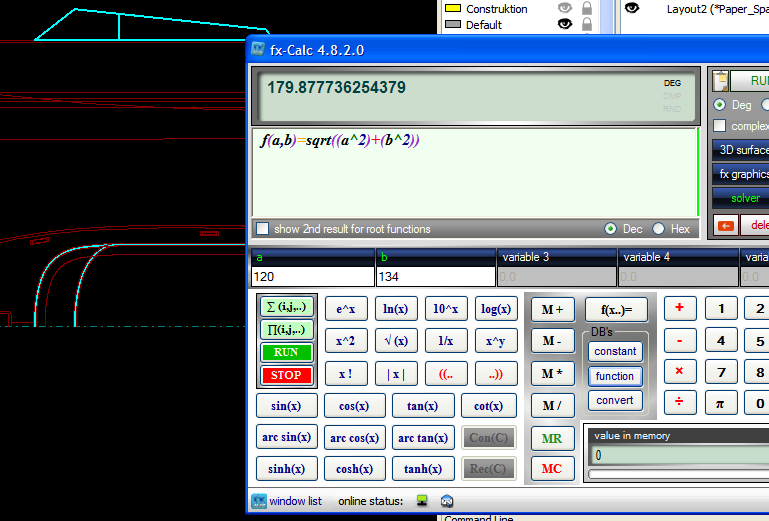
I work with fx-Calc on Windows - the nice thing about this stand alone calculator is that it has a customizable “Function Database” and it works with up to five Variables.
And … oh yes … it is free …
I start this calculator program with a keyboard shortcut (Alt Gr + c) and I’m able to keep it on top (Alt Gr + t) displayed over all other running Programs like QCAD. Yes, you are still not able to dock it to QCAD but you can place it at a convenient position and it is always visible. Hey … that is very close to docking … isn’t it.
Shortcut and “always on top” can be controlled on different ways - I use “AutoHotkey” because in the case of a move to an other Computer I have everything what I need just in one file … lazy me
Mostly I calculate pitch, angle, roof and slope for roofing. There are many online roof pitch calculators out there but I always prefer to calculate myself, keeps my brain active you know