Is there a way to change the default color of Blocks?
I am using a light gray background and the default color for Blocks seems to be white. They are too close together and I would prefer a darker default color for the Blocks. Is this possible?
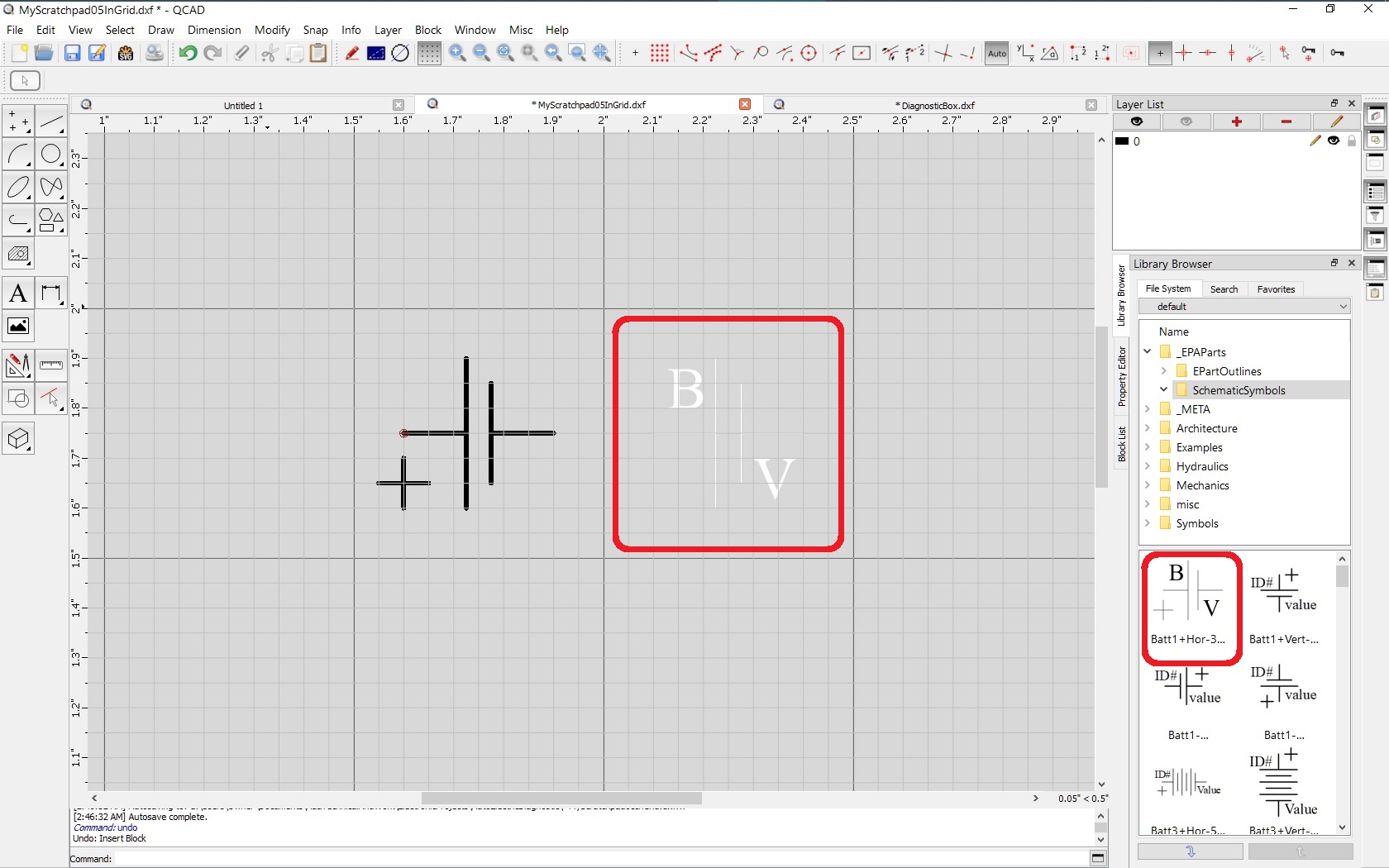
A photo is attached which shows the part which was inserted from the part library. It is on layer 0 and is black, from the layer color. But when it is exploded, right in red box, the entities become white. Those entities were set to “By Block” before the part was added to the library so they would change to the Block color, which was By Layer, after it was inserted in the drawing. That works fine and the parts/Blocks take on the colors and other attributes of the layer the block is inserted on. But the Block preview in the Library, in second red box on right, seems to have the lighter color, probably from the Block itself.
I can not find a default color setting for Blocks. Is there one?
The other parts in the library were made with different settings and they show up with dark lines. I am only talking about the circled one which I am experimenting with.
Hi,
There is no default color attribute for Blocks, inserted Block References or Block entities.
All depends.
Entities their color attribute can be ‘By Layer’, ‘By Block’ or a fixed custom color.
Layers also have attributes like color but here logical wise ‘By Layer’ & ‘By Block’ are excluded.
Block definitions (In the Block List) do not have such attributes except visibility.
A Block (definition) is made up of entities each living on a certain layer, the ‘By Layer’ color may be prominent.
Block References are also entities each living on a certain layer.
So there is some sort of inheritance chain.
What inherent what and when is also depending the Layer ‘0’ compatibility mode for the entities that live on that layer.
‘By Block’ for Block entities is meaningless from my point of view because Block definitions have no attributes to inherent.
‘By Block’ may also mean by Block Reference instead of by Block definition what makes more sense …
… Although some tests do not confirm that.
The chain also becomes unclear when we start to stack Block References in other Block References with various attributes.
…
..
.
Here I stopped experimenting with that:
406 views, 4+6 times downloaded and not a single reply except me trying to grasp things …
So it is back to trial and error.
One thing is already explained:
Block Attributes are not created on the current layer, they are created on the dedicated layer of the Attribute Definition in the Block definition.
But their final attributes like color may also be inherited or not.
I have experimented with this some more. I think my problem is that I had the elements set to By Block but by exploding the Block, there was no more block. So the By Block setting pointed to nothing. And somehow, when there is no definite color, it defaults to White.
I am sure that could be changed, even be made settable. But if I were to request any changes, there are others that I would prefer before that, long before that.
Perhaps I will set my screen background a bit darker and move on.
i also struggled a little bit about the “default” block color at the creation of an block.
Why it is always white and why is there no possibility to change this to another color if i want?
Even if the default color is not selectable, why isn’t the color of the selected layer used then?
The behaviour, that if i create a new Block and if i select the color of the content to “by Block” it is maximum confusing that it changes to white then! Especially if you do not have color correction turn on.
@andrew Is there any whay to change the “default” color for a block from white to black?
A block (block definition) does not have a color. A block is like a reusable small drawing with a name that lives inside your drawing.
A block reference (the drawing entity that displays a block) has a color and other attributes just like any other entity.
Each entity that lives inside a block also has its own color and other attributes.
If an entity inside a block has a fixed color of red, it is always displayed in red.
If an entity inside a block has color By Layer, it is displayed in the color of the layer that entity is on (regardless of the layer the block reference is on).
If an entity inside a block has color By Block, it is displayed in the color of the block reference which can again be fixed, By Layer or By Block.
If you attach your drawing and explain which entity you want to have which color, we can help you more efficiently.
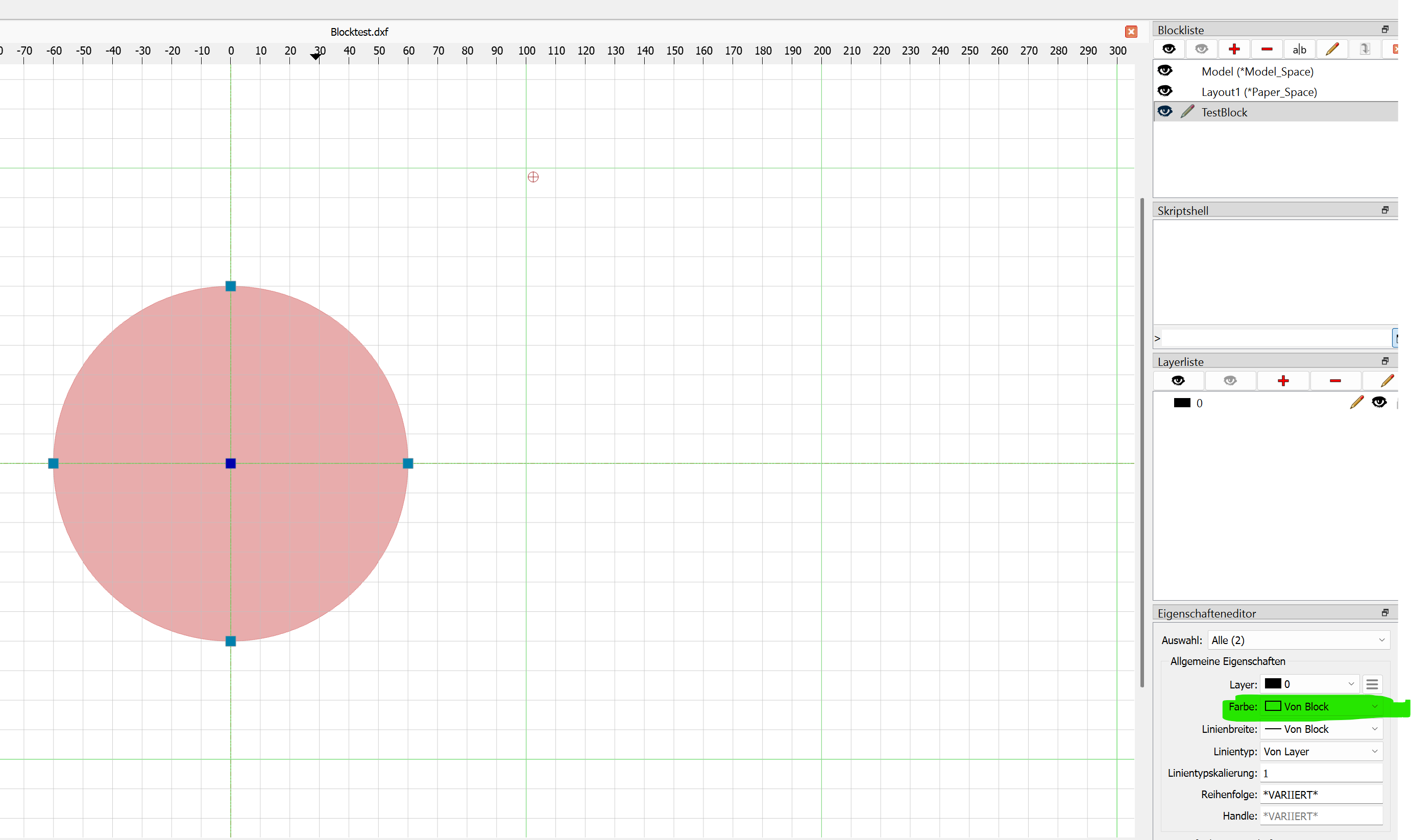
Attached i have a minimal drawing with a Block called “TestBlock”. In this Block i configured all entities to take their color “by Block” as you seen in the screenshot below.
In this case, if i have color correction disabled, i am not able to see any drawing in the block because the color is now coosen as white per default. It would be nice if i can specify this color anywhere to be other than white if i want to.
The most logical behaviour would be, that the entities in the block uses the color setting made in the current layer in which the block entities are drawn. In this case it would be black because all entities are drawn on layer 0, which is black in this case.
But i do not know if this behaviour is good in all cases.