# Seeking Assistance with dxflib Library Issues
**URL:** http://forum.qcad.org/t/seeking-assistance-with-dxflib-library-issues/8928
**Category:** dxflib Troubleshooting and Problems
**Created:** [August 6, 2024, 2:43am UTC](http://forum.qcad.org/t/seeking-assistance-with-dxflib-library-issues/8928 "2024-08-06T02:43:38Z")
**Posts on this page:** 13
**Page:** 1
### Author:  [@yan](http://forum.qcad.org/u/yan)
#### Post date: [August 6, 2024, 2:43am UTC](http://forum.qcad.org/t/seeking-assistance-with-dxflib-library-issues/8928/1 "2024-08-06T02:43:38Z")
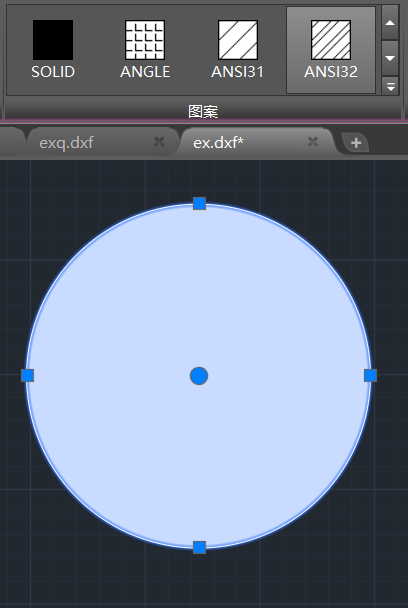
I’ve been experiencing issues with the export of filled patterns in DXF files using dxflib. The patterns are not displaying correctly in the recipient CAD software, and I am at a loss as to how to resolve this problem. I have tried various troubleshooting steps, including checking DXF version compatibility, verifying the fill pattern definitions, and adjusting coordinate systems, but the issue persists.
---
### Author:  [@CVH](http://forum.qcad.org/u/CVH)
#### Post date: [August 6, 2024, 5:43am UTC](http://forum.qcad.org/t/seeking-assistance-with-dxflib-library-issues/8928/2 "2024-08-06T05:43:24Z")
Hi, and welcome to the QCAD forum.
Perhaps have a look at: [Fill a solid circle with QCAD dxflib [Solved] - dxflib Suggestions and Feedback - QCAD Forum](https://forum.qcad.org/viewtopic.php?f=20&t=9762)
And all linked.
Exporting to AC1015 format?
If the selected circle is hatched with ANSI32 then I suspect that the scale is too small making it look filled as solid.
Regards,
CVH
---
### Author:  [@yan](http://forum.qcad.org/u/yan)
#### Post date: [August 6, 2024, 5:57am UTC](http://forum.qcad.org/t/seeking-assistance-with-dxflib-library-issues/8928/3 "2024-08-06T05:57:47Z")
I tried adjusting the scale, which was originally 1, and changed it to 1, and then the display became normal.。It’s not normal when I open it, but it will show normally after I switch the pattern.
---
### Author:  [@yan](http://forum.qcad.org/u/yan)
#### Post date: [August 6, 2024, 6:09am UTC](http://forum.qcad.org/t/seeking-assistance-with-dxflib-library-issues/8928/4 "2024-08-06T06:09:48Z")
yes,AC1015
---
### Author:  [@CVH](http://forum.qcad.org/u/CVH)
#### Post date: [August 6, 2024, 6:45am UTC](http://forum.qcad.org/t/seeking-assistance-with-dxflib-library-issues/8928/5 "2024-08-06T06:45:40Z")
Your best option is probably comparing the dxflib export with a DXF saved by QCAD containing a circular hatch textual.
I suspect that the hatch records should match.
I am not aware what the target application does when you force scale = 1.0 …
It could be that the hatch is regenerated over new and then all would be OK of course.
Changing a property with the QCAD GUI has mostly no effect when the difference is too small or zero.
In one of my replies in the linked topic I point out that I don’t know what the trailing parameters are for.
DL\_HatchData data(1, true, 1.0, 0.0, pattern, 0.0, 0.0);
> **[dxflib: DL\_HatchData Struct Reference](https://qcad.org/doc/dxflib/2.5/classref/struct_d_l___hatch_data.html)**
Perhaps you could share the code that constructs the circular hatch and Andrew can have a look at it.
Or contact him directly.
Report back when solved … That could be helpful for other dxflib users. 😉
You should be aware of dxflib licensing agreements: [QCAD - dxflib](https://qcad.org/en/90-dxflib)
Regards,
CVH
---
### Author:  [@yan](http://forum.qcad.org/u/yan)
#### Post date: [August 6, 2024, 8:06am UTC](http://forum.qcad.org/t/seeking-assistance-with-dxflib-library-issues/8928/6 "2024-08-06T08:06:38Z")
When I open the file with QCAD, it shows solid fill. Why is this
---
### Author:  [@CVH](http://forum.qcad.org/u/CVH)
#### Post date: [August 6, 2024, 8:15am UTC](http://forum.qcad.org/t/seeking-assistance-with-dxflib-library-issues/8928/7 "2024-08-06T08:15:19Z")
As in my reply above …
Perhaps you could attach code, an example file, a corrected file by the source application …
Without, we can only try to guess what could be the issue.
I also think that QCAD or the other application will fall back on SOLID filled when there are errors.
Or without the required hatch pattern installed or a virtual copy in the DXF file.
Although the linked topic was tagged as ‘SOLVED’, I did find an invalid hatch in the returned DXF file.
Regards,
CVH
---
### Author:  [@yan](http://forum.qcad.org/u/yan)
#### Post date: [August 6, 2024, 8:26am UTC](http://forum.qcad.org/t/seeking-assistance-with-dxflib-library-issues/8928/8 "2024-08-06T08:26:28Z")
DL\_HatchData hatchData(1,false,100,0,“ANGLE”);
std::vector\\> loopDatas;
std::vector\loop;
DL\_HatchEdgeData edgeData1(0, 0, 100, 0, M\_PI, true);
DL\_HatchEdgeData edgeData2(0, 0, 100, M\_PI, 2\*M\_PI, true);
loop.push\_back(edgeData1);
loop.push\_back(edgeData2);
loopDatas.push\_back(loop);
---
### Author:  [@CVH](http://forum.qcad.org/u/CVH)
#### Post date: [August 6, 2024, 9:04am UTC](http://forum.qcad.org/t/seeking-assistance-with-dxflib-library-issues/8928/9 "2024-08-06T09:04:54Z")
Rather different from: [qcad/support/examples/dxflib/main.cpp at master · qcad/qcad · GitHub](https://github.com/qcad/qcad/blob/master/support/examples/dxflib/main.cpp)
I don’t see you end the loop, end the hatch …
Regards,
CVH
---
### Author:  [@yan](http://forum.qcad.org/u/yan)
#### Post date: [August 6, 2024, 9:20am UTC](http://forum.qcad.org/t/seeking-assistance-with-dxflib-library-issues/8928/10 "2024-08-06T09:20:42Z")
void WriteToDxf::WriteHatch(const SGObjHatch\* hatch, DL\_Dxf& dxf, DL\_WriterA\* dw)
{
if (hatch == nullptr)
return;
DL\_HatchData hatchData = hatch-\>getDL\_HatchData();
DL\_Attributes attributes = getDL\_AttributesFromSGDrawBaseObj(hatch);
dxf.writeHatch1(_dw, hatchData, attributes);
std::vector\\>loopData;
loopData = hatch-\>getLoopData();
for (int i = 0; i \< loopData.size(); i++)
{
std::vector\ loop = loopData\_;
// Write hatch loops:
DL\_HatchLoopData lData(loop.size());
int type = loop[0].type;
int curveSize;
AnyCurve2d_ polyLine;
if (type == 0)
{
polyLine = hatch-\>calLoop(loop);
curveSize = polyLine-\>curveCount();
lData.numEdges = curveSize;
}
dxf.writeHatchLoop1(_dw, lData);_
_// Write hatch loop edges:
for (int k = 0; k \< loop.size(); k++)
{
DL\_HatchEdgeData shape = loop[k];_
_// line:
type = shape.type;
if (type == 0)
{
for (int i = 0; i \< curveSize; i++)
{
LineSegment2d_ line = dynamic\_cast\(polyLine-\>getBoundCurve(i));
Arc2d\* arc = dynamic\_cast\(polyLine-\>getBoundCurve(i));
if (line != nullptr)
{
Point2d startPt = line-\>startPoint();
Point2d endPt = line-\>endPoint();
dxf.writeHatchEdge(
\*dw,
DL\_HatchEdgeData(startPt.x(),
startPt.y(),
endPt.x(),
endPt.y()));
}
if (arc != nullptr)
{
Point2d center = arc-\>getCenter();
double radius = arc-\>getRadius();
dxf.writeHatchEdge(
\*dw,
DL\_HatchEdgeData(center.x(),
center.y(),
radius,
arc-\>getStartAngle(),
arc-\>getEndAngle(),
arc-\>isAntiClock()));
}
}
break;
}
if (type == 1)
{
dxf.writeHatchEdge(
_dw,
DL\_HatchEdgeData(shape.x1,
shape.y1,
shape.x2,
shape.y2));
}_
_// arc:_
_if (type == 2)
{
dxf.writeHatchEdge(
dw,
DL\_HatchEdgeData(shape.cx,
shape.cy,
shape.radius,
shape.angle1,
shape.angle2,
shape.ccw));
}_
_// full circle:
/QSharedPointer circle = shape.dynamicCast();
if (!circle.isNull()) {
dxf.writeHatchEdge(
dw,
DL\_HatchEdgeData(circle-\>getCenter().x,
circle-\>getCenter().y,
circle-\>getRadius(),
0.0,
2 \* M\_PI,
true));
}/_
_// ellipse arc:_
_if (type == 3)
{
dxf.writeHatchEdge(
dw,
DL\_HatchEdgeData(shape.cx,
shape.cy,
shape.mx,
shape.my,
shape.ratio,
shape.angle1,
shape.angle2,
shape.ccw));
}_
_// spline:_
_if (type == 4)
{
dxf.writeHatchEdge(
dw,
DL\_HatchEdgeData(shape.degree,
shape.rational, // rational
shape.periodic,
shape.knots.size(),
shape.controlPoints.size(),
shape.fitPoints.size(),
shape.knots,
shape.controlPoints,
shape.fitPoints,
shape.weights,
shape.startTangentX,
shape.startTangentY,
shape.endTangentX,
shape.endTangentY
/Geometry2dUtils::radToDegree(shape.startTangentX),
Geometry2dUtils::radToDegree(shape.startTangentY),
Geometry2dUtils::radToDegree(shape.endTangentX),
Geometry2dUtils::radToDegree(shape.endTangentY)/_
_));_
_//std::vector\splineData;
//splineData.push\_back(shape);
//AnyCurve2d spLine = hatch-\>calLoop(splineData);
//if (spLine == nullptr||spLine-\>curveCount()==0)
// continue;
//BezierCurve2d bezierCurvePtr =dynamic\_cast\(spLine-\>getBoundCurve(0));
//BSpline2d spLinePtr=nullptr;
//if (bezierCurvePtr == nullptr) {
// spLinePtr = dynamic\_cast\(spLine-\>getBoundCurve(0));
//}
//else {
// std::vector \< Point2d \> vecPts=bezierCurvePtr-\>getInterpolatePoints(20);
// int size = (int)vecPts.size();
// if (size \< 2)
// return;
// Vector2d vStart = vecPts[1] - vecPts[0];
// Vector2d vEnd = vecPts[size - 1] - vecPts[size - 2];
// spLinePtr = new BSpline2d(vecPts, vStart, vEnd);
//}
//
//if (spLinePtr == nullptr)
// continue;
//
//Vector2d startTangent = spLinePtr-\>getStartTangent();
//Vector2d endTangent = spLinePtr-\>getEndTangent();
//std::vector fitVec=spLinePtr-\>getFitPointVec();
//std::vector controlVec=spLinePtr-\>getControlPointVec();
//std::vector knotVec=spLinePtr-\>getKnotsVec();
//std::vector weightVec=spLinePtr-\>getWeightVec();
//std::vector\controlVecd;
//std::vector\fitVecd;
////knotVec.clear();
//for (auto& pt : controlVec) {
// std::vector tempVec;
// tempVec.push\_back(pt.x());
// tempVec.push\_back(pt.y());
// controlVecd.push\_back(tempVec);
//}
//for (auto& pt : fitVec) {
// std::vector tempVec;
// tempVec.push\_back(pt.x());
// tempVec.push\_back(pt.y());
// fitVecd.push\_back(tempVec);
//}
[//dxf.writeHatchEdge](http://dxf.writeHatchEdge)(
// \*dw,
// DL\_HatchEdgeData(shape.degree,
// shape.rational , // rational
// shape.periodic,
// knotVec.size(),
// controlVec.size(),
// fitVec.size(),
// knotVec,
// controlVecd,
// fitVecd,
// weightVec,
// Geometry2dUtils::radToDegree(startTangent.x()),
// Geometry2dUtils::radToDegree(startTangent.y()),
// Geometry2dUtils::radToDegree(endTangent.x()),
// Geometry2dUtils::radToDegree(endTangent.y())
//
// ));
}
}
dxf.writeHatchLoop2(\*dw, lData);
}
dxf.writeHatch2(\*dw, hatchData, attributes);
}\_
---
### Author:  [@yan](http://forum.qcad.org/u/yan)
#### Post date: [August 6, 2024, 9:21am UTC](http://forum.qcad.org/t/seeking-assistance-with-dxflib-library-issues/8928/11 "2024-08-06T09:21:49Z")
Are there any errors in the above?
---
### Author:  [@CVH](http://forum.qcad.org/u/CVH)
#### Post date: [August 7, 2024, 7:20am UTC](http://forum.qcad.org/t/seeking-assistance-with-dxflib-library-issues/8928/12 "2024-08-07T07:20:47Z")
Please put long code in a code panel with the [\] button.
Now it took some time to re-format the text before it was readable to me.
I am not a specialist on this matter and C++ looks a bit different than JS
From your code I presume that the circular boundary is not exported as a full circle.
That part is ruled out.
The origin is thus the first part of your code and I presume this is intended to export polyline edges.
For a single polyline because the edges loop is terminated with a break afterwards.
There is also something about Arcs in DXF.
It is clear that RDxfExporter diversifies between reversed or not:
>
I have a problem with understanding:
- cycling loopData with i but the index is not used.
- cycling loop = loopData with k
- cycling curveSize nested but again with i
For the rest I can’t detect anything wrong but again, I am not a specialist on this matter.
Also discovered what the trailing parameters stand for.
They define the pattern origin, a most important feature for patterned hatches.
>
Presumed it but it is not explained as such in the reference:
> **[dxflib: DL\_HatchData Struct Reference](https://qcad.org/doc/dxflib/2.5/classref/struct_d_l___hatch_data.html)**
Regards,
CVH
---
### Author:  [@yan](http://forum.qcad.org/u/yan)
#### Post date: [August 7, 2024, 8:30am UTC](http://forum.qcad.org/t/seeking-assistance-with-dxflib-library-issues/8928/13 "2024-08-07T08:30:13Z")
Thank you for your reply, you gave me a lot of tips and help