'm having difficulty troubleshooting why QCAD will automatically scale down the size of the object I copy and paste onto the same page or even a new page. I must of toggled something on at some point and now I’m unable to discover what’s causing this. Any suggestions on how to resolve this so QCAD will paste 1:1?
![20230103_074009[40].jpg](https://cdn.qcad.org/original/2X/9/97ba9d61f3524d73b30ed16df01b4889bd49e9e9.jpeg)
hi,
Welcome to the forum,
I’m having difficulty troubleshooting why QCAD will automatically scale down the size of the object I copy and paste onto the same page or even a new page. I must of toggled something on at some point and now I’m unable to discover what’s causing this. Any suggestions on how to resolve this so QCAD will paste 1:1?
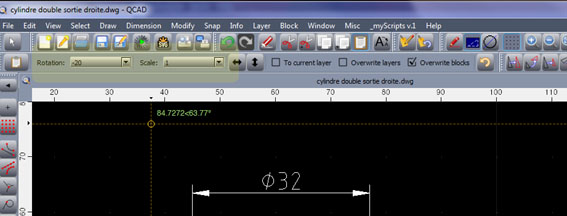
Have a look at the copy/paste options in the tool bar:
I’m a fairly new user to QCAD and was wondering if you could provide me a little more detail? My menu bar doesn’t look anything like yours. In fact its the way it was when I purchased my subscription.
Just after you selected Paste a toolbar would have appeared ‘somewhere’ at the top containing the following and as indicated by J-J…

…just make sure the scale is as shown or 1 1. The Paste options toolbar will always look like this.
@Pete
Is your pasting scale really “0 0”?
I don’t even see a decimal point so your scale would be <0><0>. 
That would be an error and in red over here.
I would understand “1:1” but “1 1” is again an error.
In my case the Paste Scale option is decimal or [1, 1/2, 1/3, 1/4, 1/5, 1/10, 2, 3, …].
That is a fixed list incorporated in the Paste.ui widget.
@JBLDeere
About every tool in QCAD uses an Option Toolbar, so keep an eye open on the options of the tool. 
I would set the Scale value to “1” or whatever suits you at the instance of pasting.
Regards,
CVH
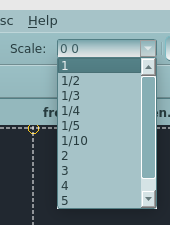
Noop and probably your Theme doesn’t displays errors in red … e_surprised
That is formatted by the RMathLineEdit class.
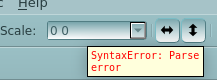
If you hover over the Scale field the tooltip should be a SyntaxError.
Regards,
CVH
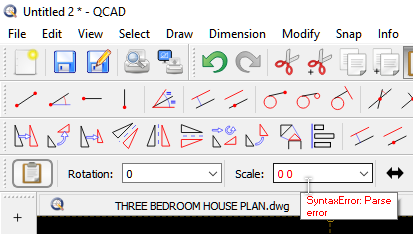
Toolbars and many other things in QCAD are customisable.
Most option setting are persistent, meaning that they remember the prior used options or settings.
If it is a default installation I would presume the Paste options reset themselves on a new use.
Go to menu Edit .. Application Preferences .. Edit .. Paste and activate “Reset to defaults every time tool is used”.
If you are more acquainted with the look and feel of QCAD then you could deactivate this.
Regards,
CVH
True, but you have to agree “0 0” should be in red as in your screen caption …
Or the lubricant must be dyed accordingly. 
Regards,
CVH
probably does
I appreciate all of your support! Thank you.
The tooltip is correctly formatted in red on its background.
Now I start to wonder why the Scale field isn’t …
Time to dive into the RMathLineEdit class.
Regards,
CVH